

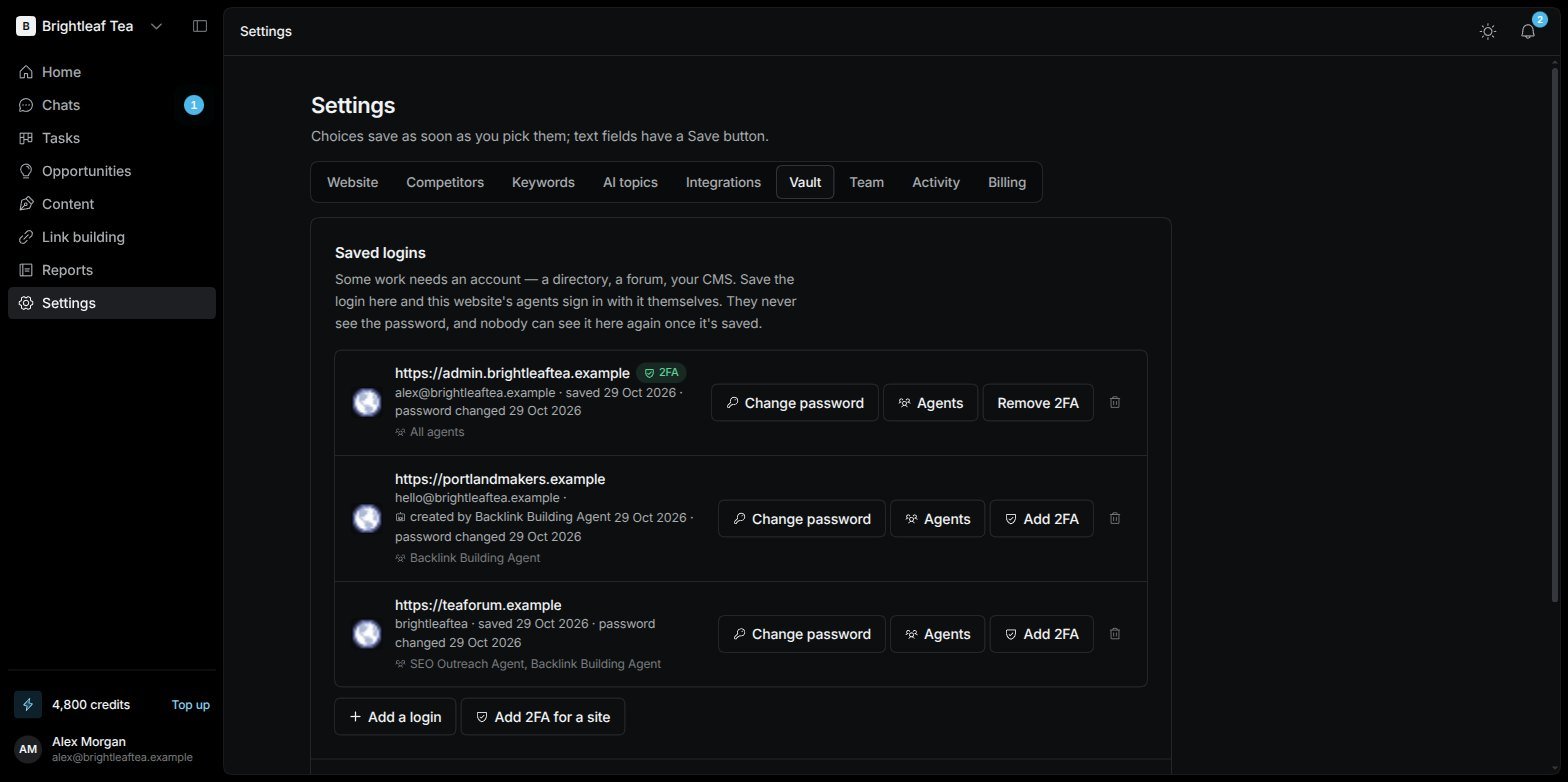
Settings › Vault: saved logins, and which agents can use each one
Nobody ever sees a saved password again — not you, not your team, not the agents. Agents sign in with it inside their browser without reading it. You can change a password, but never view it.
Add a login
1
Start
Choose Add a login.
2
Fill it in
The Site, the Username or email, and the Password.
3
Choose who can use it
Which agents can use it — All agents, or tick the ones you want. Pick at least one.
Two-factor codes
If a site asks for a code from an authenticator app, the agents can make those codes themselves. Choose Add 2FA on a login (or Add 2FA for a site) and paste the setup key — the one under “can’t scan the code?” when you set up 2FA on that site. Remove 2FA takes it off.Or sign in yourself
Some sign-ins can’t be done with a saved password — “Sign in with Google”, a magic link, a code sent to your phone. For those, sign in yourself in the website’s own browser:1
Open the site
Type the Site to sign in to — for example
producthunt.com/login — and choose Open and sign in. A new tab opens.2
Sign in there
Sign in in that tab as you normally would, then press Done there.
3
That's it
The agents stay signed in to that site from then on.