Create your account, launch a company on a 7-day trial, and set up your first project with the Head Agent already in place.
By the end of this page you will have a Visibility account, a Company running on a free trial, your first Project, and an agent working on a Task. Plan on about an hour, most of it waiting for your first Run to finish.Everything in Visibility lives inside a Company — the workspace for one business. Each Company has its own plan, team, agents and projects. Sign in at app.visibility.so.
You can sign up with an email address and password, or with Google or X.
Email and password
Google or X
1
Open the sign-up page
Go to app.visibility.so/register.
2
Fill in your details
Enter your Full name, Email and a Password of at least 8 characters, then click Create account. The button stays disabled until all three fields are filled.
3
Confirm your email
Open the email titled Your Visibility verification code and type the 6-digit code on the Confirm your email screen. The code expires after 10 minutes.
4
Verify
Click Verify email. You are signed in and taken to Create a company.
If the code doesn’t arrive, wait for the 60-second countdown and click Resend code. If the address already belongs to a Google or X account, entering the code adds a password to that account and signs you in.
1
Choose a provider
On the sign-up page click Sign up with Google or Sign up with X. On the sign-in page the same buttons read Continue with Google and Continue with X.
2
Approve the request
Confirm at the provider. You return to Visibility signed in, on the Create a company page.
If you already had an email-and-password account with the same confirmed address, the provider is linked to it automatically and both methods work from then on. You can see which methods are connected in the Sign-in methods card of your Account dialog.
The sign-up page offers Google, X, or email and password.
If Visibility is invite-only when you sign up, you’ll be asked to request access and wait for approval — see Requesting access below. People joining an existing company from a team invite skip this entirely.
Visibility is currently invite-only, so signing up is two steps rather than one: you create your account as above, and then ask for access. Your account is real either way — the password you set works, and you sign in with it once you’re approved.
1
Fill in the request
Straight after sign-up you land on Request access, which reads “Visibility is invite-only right now. Tell us a little about you and we’ll be in touch by email.” It asks a short set of questions about you and your company — currently your company name, its website, your role, your team size and your LinkedIn profile.Website and LinkedIn fields accept a plain address: type acme.com or linkedin.com/in/yourname and it is understood. You do not need https://.
2
Send it
Click Request access. Anything required that you have left blank is named in the message, so nothing is lost when a field is missed.
3
Wait for the email
The page becomes You’re on the list, showing the date you applied. Our team reviews the request and emails you when it is approved; you can sign in with the same account the moment it is. You can sign out from this screen and come back later — signing back in returns you here, so nothing is lost.
If a request is not accepted, the page says Not accepted right now rather than leaving you refreshing a pending screen forever. Your details are kept in case that changes.
A team invite is not affected by any of this. If a colleague invited you to their company, you go straight from sign-up to the Join screen — you are never asked to request access, whether invite-only is on or not.
Creating a Company takes two steps and a short launch screen. Nothing is saved until you pick a plan, so you can abandon the first step without leaving anything behind.
1
Name the company
Under Company details, type a Company name and an optional Description, then click Continue. You can change both later in Company settings.
2
Choose a plan
Under Choose a plan, click Start 7-day trial on the plan you want. Each card lists what it includes: projects, team members, agents and keyword tracking. The Enterprise card has a Contact sales button that opens an email to the sales team.
3
Add a card at secure checkout
Starting the trial takes you to secure checkout to add a card. You are not charged until the trial ends. To pay immediately instead, click Skip trial & pay now on the plan card.
4
Wait for the launch
Back in Visibility you see Setting up your workspace, then You’re all set, and you are taken to your new Company’s Overview.
Step 2 of company creation: pick a plan to launch the workspace.
If you close checkout without finishing, you see Checkout cancelled with Back to plans. No payment is taken. The half-created Company shows a Finish onboarding notice with a Continue onboarding button on its Overview until a plan is active, and every other sidebar item stays locked until then.
3 projects, 10 team members, 10 agents, unlimited keyword tracking
Growth
$199 per month
6 projects, 20 team members, 20 agents, unlimited keyword tracking
Enterprise
Custom
Tailored to your scale and needs — click Contact sales
Both Starter and Growth include 5,000 credits per month, refilled on the 1st of each month. Credits pay for metered work such as keyword rank checks and AI Visibility checks; 1 credit is $0.01. See Credits and BYOK.
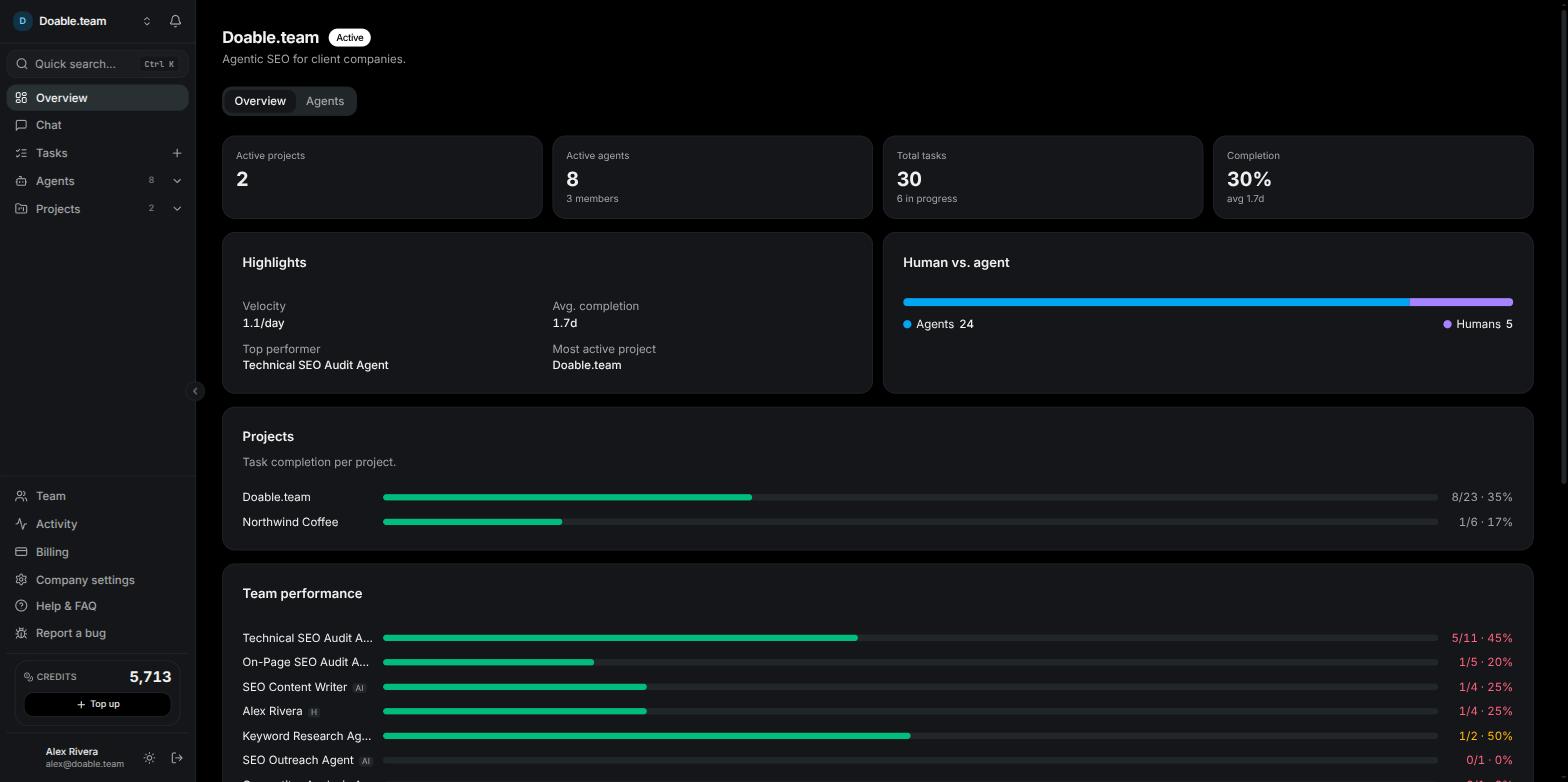
Your new Company opens on its Overview: the company name and status at the top, stat tiles for active projects, active agents, total tasks and completion, and an Agents tab beside Overview.Your Head Agent is already there. Every Company gets exactly one when it launches. Its preset is shown as SEO Manager, it carries a Head badge on the Agents tab, and it appears under Agents in the sidebar with a status dot. The Head Agent plans the SEO work for the company and proposes the other agents it needs. When it proposes a hire, the request lands in your Inbox as an Agent hire approval for you to accept or reject.
A freshly launched Company: the Overview with the Head Agent already listed under Agents.
The Head Agent performs short maintenance runs every day. They show up on its Runs tab, so don’t be surprised to see activity before you’ve assigned anything.
The left sidebar frames every page: the company switcher and Inbox bell at the top, Quick search (Ctrl K, or Cmd K on Mac), then Overview, Chat, Tasks, Agents and Projects, followed by Team, Activity, Billing and Company settings for members with the matching permissions. Your credit balance and profile sit at the bottom. For a full tour, see Navigating the app.
A Project is one website you want to rank. Its reports, opportunities, content and link building all live inside it.
1
Open the New project dialog
In the sidebar expand Projects and click Add project. You can also press Ctrl K and choose New project, or click New project on the Projects page.
2
Name it
Type the Project name.
3
Enter your domain
Under SEO Configuration, fill in Your domain, for example yourbrand.com. This becomes fixed once data collection starts, so check the spelling. Optionally add Competitor domains, separated by commas.
4
Describe it (optional)
Add a description, or, where available, click the sparkle button Write this description with AI and confirm Generate to have one drafted from your site.
5
Assign people and agents (optional)
Use Assign people & agents to record who is responsible. Assigning people does not hide the project from other members.
6
Create it
Click Create project. You land on the project’s Overview with its own sidebar: Overview, Tasks, Reports, Opportunities, Content, Link building and Settings.
The New project dialog with the SEO Configuration section.
Every project feature starts switched on. Turn off anything you don’t need later in Project Settings → Features. If you close the dialog part-way, your draft is kept until you click Discard. Starter allows 3 projects and Growth 6; when you reach the limit the dialog tells you. See Projects for everything a project can do.
With a Company and a Project in place, four things get real work flowing.
1
Add the keywords you care about
Open your project and choose Keyword Ranking in the project sidebar, then add the keywords you want to track and the location that matters to you. Rankings refresh automatically on the project’s schedule (weekly by default) and whenever you click Fetch rankings now. Rank checks are metered — currently 5 credits per keyword per location, shown in the app before you spend. See Keyword rankings.
2
Connect Google
Connect Google Search Console and Google Analytics so the Organic Traffic report fills with your real clicks, impressions and sessions. See Integrations and Organic traffic.
3
Hire an agent to audit the site
Click Add agent under Agents in the sidebar, or press Ctrl K and choose Hire agent. Pick a preset that audits your pages — on-page and technical checks are the usual first hire. As an admin, hiring from the Hire agent page creates the agent immediately. New agents run on the Visibility AI models in the Model dropdown, metered in credits, unless you connect your own AI client. See Agents.
4
Assign a task
Click the + beside Tasks in the sidebar, or press Ctrl K and choose New task. Describe the outcome you want and assign the task to your new agent. The agent starts a Run; you are notified in the app when it comments or finishes, through the bell next to the company name and the bottom-right notification dock. Open the run to see what it did, along with the tokens used and the cost. See Tasks.
Two more things worth doing while you wait for that first run:
Open Chat and ask the Head Agent what it would tackle first. Agents reply only while they are active, so resume a paused agent before messaging it. See Chat.
Open AI Visibility in the project’s Reports and set up the prompts you want checked against ChatGPT, Claude, Gemini and Perplexity. Checks run weekly by default, or click Run now. See AI Visibility.
If a teammate has already set up a Company, you don’t create one — you join theirs.
1
Open the invitation
Click the link in the invitation email, or the invite link your teammate shared.
2
Sign in or sign up
If you aren’t signed in, create an account or sign in. You are brought back to the invitation automatically.
3
Join
Check the card — it names who invited you and your role — and click Join. The button carries the company’s name, for example Join Acme Corp. You land on that Company’s Overview.
Invitations are addressed to one email address: sign in with exactly that address, or you’ll see this invite was sent to a different email address. Links expire after 7 days and work once. If you see This invite is no longer valid, ask a company admin to send a new one.
Joining counts against the Company’s team-member limit (10 on Starter, 20 on Growth). If the Company is full, the admin needs to make room before you can join. See Team management.
On the sign-in page click Forgot password?, enter your email and click Send reset link. You always see Check your inbox, whether or not an account exists for that address.
2
Open the email
Open Reset your Visibility password and follow the link. It expires after 1 hour and works once.
3
Set a new password
Enter and confirm a password of at least 8 characters and click Update password.
4
Sign in again
Click Go to sign in. Every other signed-in session is signed out when the password changes.
This also works for accounts created with Google or X: it sets a password so you can sign in with your email as well. To change a password you still know, use the Password section of the Account dialog.
The sidebar, Quick search, notifications and the project sidebar.
Agents
How the Head Agent works, hiring specialists, and reading a Run.
Projects
Settings, schedules, reports and features for each website.
Billing and subscriptions
Plans, the trial, top-ups and what happens when a subscription ends.
Stuck? Click Help & FAQ at the bottom of the sidebar, use Report a bug to send a note straight to the team, or open the floating support button for live chat. See the FAQ.
{"docsConfig":{"theme":"mint","$schema":"https://mintlify.com/docs.json","name":"Visibility Docs","colors":{"primary":"#171717","light":"#e5e5e5","dark":"#0a0a0a"},"logo":{"light":"https://mintcdn.com/doableteam-a944c448/yZxfxMRqwidNc6fj/logo/light.png?fit=max\u0026auto=format\u0026n=yZxfxMRqwidNc6fj\u0026q=85\u0026s=e1fd35ed3273f515f71eeea2dadf78bc","dark":"https://mintcdn.com/doableteam-a944c448/rtDno5BzOkv5Z5j1/logo/dark.png?fit=max\u0026auto=format\u0026n=rtDno5BzOkv5Z5j1\u0026q=85\u0026s=b596ae0dadfdf638afa6e7647926f980"},"favicon":"https://mintcdn.com/doableteam-a944c448/zTMBed2Ps_Y8Loxi/favicon2.png?fit=max\u0026auto=format\u0026n=zTMBed2Ps_Y8Loxi\u0026q=85\u0026s=ee604d5930191a7b8e1e524f7bfa06a5","footer":{"socials":{},"links":[{"header":"Product","items":[{"label":"Open Visibility","href":"https://app.visibility.so"},{"label":"Status","href":"https://status.visibility.so"}]}]},"icons":{"library":"fontawesome"},"styling":{"latex":true},"navigation":{"pages":[]}},"deployment":{"deploymentMetadataValue":{"subdomain":"doableteam-a944c448","hasAudioNarration":false,"actualSubdomain":"doableteam-a944c448","customDomains":["docs.visibility.so"],"gitSource":{"type":"github","owner":"muhammedilyasy","repo":"visibility-docs","deployBranch":"main","isPrivate":true,"contentDirectory":"","mountPath":"","label":""},"chroma":{"liveDeploymentHistoryId":"6aa1001aa24ff9286dbd94f6","collectionId":"c6362ac3-9167-4500-94f6-a10bb4528c5f","schemaVersion":"v3","latestBuiltDeploymentHistoryId":"6aa1001aa24ff9286dbd94f6"},"entitlements":{},"buildId":"6aa1001aa24ff9286dbd94f6","clientVersion":"0.0.3908","searchFilterCounts":[{"language":"default","tag":"Documentation","count":22},{"language":"default","tag":"Projects \u0026 SEO","count":9},{"language":"default","tag":"Agents \u0026 work","count":4},{"language":"default","tag":"Team \u0026 company","count":3},{"language":"default","tag":"Getting started","count":3},{"language":"default","tag":"Billing","count":2},{"language":"default","tag":"Changelog","count":1},{"language":"default","tag":"Updates","count":1},{"language":"default","tag":"FAQ","count":1},{"language":"default","tag":"Help","count":1}]},"assistantConfig":{"enableAskAiButton":false,"enableStarterQuestions":false,"enableContextualStarterQuestions":false,"enableAskAiSearchBar":true},"hasChatPermissions":false,"hasWebMcpPermissions":false,"toggles":[{"name":"kill-isr","enabled":true,"variant":{"name":"disabled","enabled":false,"feature_enabled":true},"impressionData":false},{"name":"agent-mintlify-slack","enabled":true,"variant":{"name":"disabled","enabled":false,"feature_enabled":true},"impressionData":false},{"name":"editor-v7-file-tree","enabled":true,"variant":{"name":"disabled","enabled":false,"feature_enabled":true},"impressionData":false},{"name":"agent-integrations-settings","enabled":true,"variant":{"name":"disabled","enabled":false,"feature_enabled":true},"impressionData":false},{"name":"automations-pr-grouping","enabled":true,"variant":{"name":"disabled","enabled":false,"feature_enabled":true},"impressionData":false},{"name":"custom-prefix","enabled":true,"variant":{"name":"disabled","enabled":false,"feature_enabled":true},"impressionData":false},{"name":"analytics-v7","enabled":true,"variant":{"name":"disabled","enabled":false,"feature_enabled":true},"impressionData":false},{"name":"user-flows-analytics","enabled":true,"variant":{"name":"disabled","enabled":false,"feature_enabled":true},"impressionData":false},{"name":"no-publish-flow","enabled":true,"variant":{"name":"disabled","enabled":false,"feature_enabled":true},"impressionData":false},{"name":"workos-onboarding","enabled":true,"variant":{"name":"disabled","enabled":false,"feature_enabled":true},"impressionData":false},{"name":"llms-txt-v2","enabled":true,"variant":{"name":"disabled","enabled":false,"feature_enabled":true},"impressionData":false},{"name":"pause-universal-search-reconcile","enabled":true,"variant":{"name":"disabled","enabled":false,"feature_enabled":true},"impressionData":false},{"name":"snapshot-serving-live","enabled":true,"variant":{"name":"disabled","enabled":false,"feature_enabled":true},"impressionData":false},{"name":"stripTemperatureMiddleware","enabled":true,"variant":{"name":"disabled","enabled":false,"feature_enabled":true},"impressionData":false},{"name":"per-site-search-delta","enabled":true,"variant":{"name":"disabled","enabled":false,"feature_enabled":true},"impressionData":false},{"name":"support-platform-pylon-zendesk","enabled":true,"variant":{"name":"disabled","enabled":false,"feature_enabled":true},"impressionData":false},{"name":"editor-branches-v2-autocommit","enabled":true,"variant":{"name":"disabled","enabled":false,"feature_enabled":true},"impressionData":false},{"name":"editor-branches-v2","enabled":true,"variant":{"name":"disabled","enabled":false,"feature_enabled":true},"impressionData":false},{"name":"snapshot-serving","enabled":true,"variant":{"name":"disabled","enabled":false,"feature_enabled":true},"impressionData":false},{"name":"instant-rollback","enabled":true,"variant":{"name":"disabled","enabled":false,"feature_enabled":true},"impressionData":false},{"name":"granular-notifications-server","enabled":true,"variant":{"name":"disabled","enabled":false,"feature_enabled":true},"impressionData":false},{"name":"granular-notifications","enabled":true,"variant":{"name":"disabled","enabled":false,"feature_enabled":true},"impressionData":false},{"name":"editor-private-page-search","enabled":true,"variant":{"name":"disabled","enabled":false,"feature_enabled":true},"impressionData":false},{"name":"automations-fable","enabled":true,"variant":{"name":"disabled","enabled":false,"feature_enabled":true},"impressionData":false},{"name":"fixed-ai-action-pricing","enabled":true,"variant":{"name":"disabled","enabled":false,"feature_enabled":true},"impressionData":false},{"name":"automation-resolve-merge-conflict","enabled":true,"variant":{"name":"disabled","enabled":false,"feature_enabled":true},"impressionData":false},{"name":"scoped-publishing","enabled":true,"variant":{"name":"disabled","enabled":false,"feature_enabled":true},"impressionData":false},{"name":"mintql","enabled":true,"variant":{"name":"disabled","enabled":false,"feature_enabled":true},"impressionData":false},{"name":"page-level-analytics","enabled":true,"variant":{"name":"disabled","enabled":false,"feature_enabled":true},"impressionData":false},{"name":"teamspace","enabled":true,"variant":{"name":"disabled","enabled":false,"feature_enabled":true},"impressionData":false},{"name":"editor-version-history-v2","enabled":true,"variant":{"name":"disabled","enabled":false,"feature_enabled":true},"impressionData":false},{"name":"vite-origin","enabled":true,"variant":{"name":"disabled","enabled":false,"feature_enabled":true},"impressionData":false},{"name":"editor-nav-generations","enabled":true,"variant":{"name":"disabled","enabled":false,"feature_enabled":true},"impressionData":false},{"name":"billing-page-v2","enabled":true,"variant":{"name":"disabled","enabled":false,"feature_enabled":true},"impressionData":false},{"name":"workspace-projects","enabled":true,"variant":{"name":"disabled","enabled":false,"feature_enabled":true},"impressionData":false},{"name":"assistant-v5","enabled":true,"variant":{"name":"disabled","enabled":false,"feature_enabled":true},"impressionData":false},{"name":"byok-sep-25","enabled":true,"variant":{"name":"disabled","enabled":false,"feature_enabled":true},"impressionData":false},{"name":"fork-pr-previews","enabled":true,"variant":{"name":"disabled","enabled":false,"feature_enabled":true},"impressionData":false},{"name":"revalidation-jwt","enabled":true,"variant":{"name":"disabled","enabled":false,"feature_enabled":true},"impressionData":false},{"name":"editor-agent-model-picker","enabled":true,"variant":{"name":"disabled","enabled":false,"feature_enabled":true},"impressionData":false},{"name":"client-snapshot-docs-config","enabled":true,"variant":{"name":"disabled","enabled":false,"feature_enabled":true},"impressionData":false},{"name":"hobby-abuse-scan","enabled":true,"variant":{"name":"disabled","enabled":false,"feature_enabled":true},"impressionData":false},{"name":"dashboard-inbox","enabled":true,"variant":{"name":"disabled","enabled":false,"feature_enabled":true},"impressionData":false}],"isAtlas":false,"googleFontsInlined":false},"customCss":[{"filePath":"index.css","content":":root{--background:#ffffff!important;--primary:#1a1918!important;--primary-light:#444444!important;--text-main:#1a1918!important;--text-muted:#6b7280!important;--border-color:#e5e7eb!important;--card-bg:#ffffff!important;--sidebar-bg:#fafafa!important}.dark{--background:#1a1918!important;--primary:#ffffff!important;--primary-light:#eeeeee!important;--text-main:#ffffff!important;--text-muted:#9ca3af!important;--border-color:#333333!important;--card-bg:#242322!important;--sidebar-bg:#111111!important}body{background-color:var(--background)!important}#sidebar-content,.sidebar-container{background-color:var(--sidebar-bg)!important}.logo,.logo img,a[href*=\"visibility.so\"] img,a[href=\"/\"] img,header img,nav img{height:38px!important;max-height:38px!important;width:auto!important}body,h1,h2,h3,h4,h5,h6{color:var(--text-main)!important}a{color:var(--primary)!important;text-decoration-color:var(--border-color)!important}.card,div[class*=Card]{background-color:var(--card-bg)!important;border:1px solid var(--border-color)!important}.card:hover,div[class*=Card]:hover{border-color:var(--primary)!important}code,pre{border-color:var(--border-color)!important}::-webkit-scrollbar{width:8px}::-webkit-scrollbar-track{background:var(--background)}::-webkit-scrollbar-thumb{background:var(--border-color);border-radius:4px}::-webkit-scrollbar-thumb:hover{background:var(--primary-light);border-radius:4px}#header-tabs-container .header-tab,.header-tab,nav[class*=HeaderTabs] a{font-weight:500!important;font-size:.95rem!important;padding:8px 16px!important;transition:all .25s cubic-bezier(.4,0,.2,1)!important;border-bottom:2px solid transparent!important;color:var(--text-muted)!important}#header-tabs-container .header-tab:hover,.header-tab:hover,nav[class*=HeaderTabs] a:hover{color:var(--primary)!important;opacity:1!important}#header-tabs-container .header-tab::after,.header-tab::after,.nav-tabs-item::after,.nav-tabs-item>div{display:none!important;content:none!important}.nav-tabs-item{position:relative!important;padding-bottom:0!important}.header-tab-active,.nav-tabs-item[class*=\"dark:text-gray-200\"],.nav-tabs-item[class*=text-gray-800]{color:var(--primary)!important;font-weight:600!important}.header-tab svg,.nav-tabs-item svg,nav[class*=HeaderTabs] a svg{margin-right:8px!important;width:16px!important;height:16px!important;display:inline-block!important;vertical-align:middle!important}"}],"page":{"pagePath":"getting-started","slug":"/getting-started","pageMetadata":{"title":"Getting started","description":"Create your account, launch a company on a 7-day trial, and set up your first project with the Head Agent already in place.","href":"/getting-started"},"description":{"compiledSource":"\"use strict\";\nconst {jsx: _jsx} = arguments[0];\nconst {useMDXComponents: _provideComponents} = arguments[0];\nfunction _createMdxContent(props) {\n const _components = {\n p: \"p\",\n ..._provideComponents(),\n ...props.components\n };\n return _jsx(_components.p, {\n children: \"Create your account, launch a company on a 7-day trial, and set up your first project with the Head Agent already in place.\"\n });\n}\nfunction MDXContent(props = {}) {\n const {wrapper: MDXLayout} = {\n ..._provideComponents(),\n ...props.components\n };\n return MDXLayout ? _jsx(MDXLayout, {\n ...props,\n children: _jsx(_createMdxContent, {\n ...props\n })\n }) : _createMdxContent(props);\n}\nreturn {\n default: MDXContent\n};\n","frontmatter":{},"scope":{}},"pageType":"default","mdx":{"mdxSource":{"compiledSource":"\"use strict\";const{Fragment:_Fragment,jsx:_jsx,jsxs:_jsxs}=arguments[0];const{useMDXComponents:_provideComponents}=arguments[0];function _createMdxContent(props){const _components={a:`a`,code:`code`,li:`li`,p:`p`,strong:`strong`,tbody:`tbody`,td:`td`,th:`th`,thead:`thead`,tr:`tr`,ul:`ul`,..._provideComponents(),...props.components},{Card,CardGroup,Frame,Heading,Info,Note,OptimizedImage,Step,Steps,Tab,Table,Tabs,Tip,Warning}=_components;if(!Card)_missingMdxReference(`Card`,true);if(!CardGroup)_missingMdxReference(`CardGroup`,true);if(!Frame)_missingMdxReference(`Frame`,true);if(!Heading)_missingMdxReference(`Heading`,true);if(!Info)_missingMdxReference(`Info`,true);if(!Note)_missingMdxReference(`Note`,true);if(!OptimizedImage)_missingMdxReference(`OptimizedImage`,true);if(!Step)_missingMdxReference(`Step`,true);if(!Steps)_missingMdxReference(`Steps`,true);if(!Tab)_missingMdxReference(`Tab`,true);if(!Table)_missingMdxReference(`Table`,true);if(!Tabs)_missingMdxReference(`Tabs`,true);if(!Tip)_missingMdxReference(`Tip`,true);if(!Warning)_missingMdxReference(`Warning`,true);return _jsxs(_Fragment,{children:[_jsx(_components.p,{children:`By the end of this page you will have a Visibility account, a Company running on a free trial, your first Project, and an agent working on a Task. Plan on about an hour, most of it waiting for your first Run to finish.`}),`\n`,_jsxs(_components.p,{children:[`Everything in Visibility lives inside a `,_jsx(_components.strong,{children:`Company`}),` — the workspace for one business. Each Company has its own plan, team, agents and projects. Sign in at `,_jsx(_components.code,{children:`app.visibility.so`}),`.`]}),`\n`,_jsx(Heading,{level:`2`,id:`create-your-account`,children:`Create your account`}),`\n`,_jsx(_components.p,{children:`You can sign up with an email address and password, or with Google or X.`}),`\n`,_jsxs(Tabs,{children:[_jsxs(Tab,{title:`Email and password`,id:`email-and-password`,children:[_jsxs(Steps,{children:[_jsx(Step,{title:`Open the sign-up page`,children:_jsxs(_components.p,{children:[`Go to `,_jsx(_components.code,{children:`app.visibility.so/register`}),`.`]})}),_jsx(Step,{title:`Fill in your details`,children:_jsxs(_components.p,{children:[`Enter your `,_jsx(_components.strong,{children:`Full name`}),`, `,_jsx(_components.strong,{children:`Email`}),` and a `,_jsx(_components.strong,{children:`Password`}),` of at least 8 characters, then click `,_jsx(_components.strong,{children:`Create account`}),`. The button stays disabled until all three fields are filled.`]})}),_jsx(Step,{title:`Confirm your email`,children:_jsxs(_components.p,{children:[`Open the email titled `,_jsx(_components.strong,{children:`Your Visibility verification code`}),` and type the 6-digit code on the `,_jsx(_components.strong,{children:`Confirm your email`}),` screen. The code expires after 10 minutes.`]})}),_jsx(Step,{title:`Verify`,children:_jsxs(_components.p,{children:[`Click `,_jsx(_components.strong,{children:`Verify email`}),`. You are signed in and taken to `,_jsx(_components.strong,{children:`Create a company`}),`.`]})})]}),_jsxs(_components.p,{children:[`If the code doesn’t arrive, wait for the 60-second countdown and click `,_jsx(_components.strong,{children:`Resend code`}),`. If the address already belongs to a Google or X account, entering the code adds a password to that account and signs you in.`]})]}),_jsxs(Tab,{title:`Google or X`,id:`google-or-x`,children:[_jsxs(Steps,{children:[_jsx(Step,{title:`Choose a provider`,children:_jsxs(_components.p,{children:[`On the sign-up page click `,_jsx(_components.strong,{children:`Sign up with Google`}),` or `,_jsx(_components.strong,{children:`Sign up with X`}),`. On the sign-in page the same buttons read `,_jsx(_components.strong,{children:`Continue with Google`}),` and `,_jsx(_components.strong,{children:`Continue with X`}),`.`]})}),_jsx(Step,{title:`Approve the request`,children:_jsxs(_components.p,{children:[`Confirm at the provider. You return to Visibility signed in, on the `,_jsx(_components.strong,{children:`Create a company`}),` page.`]})})]}),_jsxs(_components.p,{children:[`If you already had an email-and-password account with the same confirmed address, the provider is linked to it automatically and both methods work from then on. You can see which methods are connected in the `,_jsx(_components.strong,{children:`Sign-in methods`}),` card of your `,_jsx(_components.a,{href:`/account`,children:`Account`}),` dialog.`]})]})]}),`\n`,_jsx(Frame,{caption:`The sign-up page offers Google, X, or email and password.`,children:_jsx(OptimizedImage,{src:`https://mintcdn.com/doableteam-a944c448/vfpuZshuNSFIBxvy/images/register.jpg?fit=max\u0026auto=format\u0026n=vfpuZshuNSFIBxvy\u0026q=85\u0026s=293ad73dc4811e8bf5c0c16b05d29803`,alt:`The Create your account form with Sign up with Google, Sign up with X, and the name, email and password fields`,\"data-og-width\":`1568`,width:`1568`,\"data-og-height\":`782`,height:`782`,\"data-path\":`images/register.jpg`,\"data-optimize\":`true`,\"data-opv\":`3`,srcset:`https://mintcdn.com/doableteam-a944c448/vfpuZshuNSFIBxvy/images/register.jpg?w=280\u0026fit=max\u0026auto=format\u0026n=vfpuZshuNSFIBxvy\u0026q=85\u0026s=036c18ebbf1cdf9ae67f87addfadfc35 280w, https://mintcdn.com/doableteam-a944c448/vfpuZshuNSFIBxvy/images/register.jpg?w=560\u0026fit=max\u0026auto=format\u0026n=vfpuZshuNSFIBxvy\u0026q=85\u0026s=23181ab065c7cc646924ca631dc30ece 560w, https://mintcdn.com/doableteam-a944c448/vfpuZshuNSFIBxvy/images/register.jpg?w=840\u0026fit=max\u0026auto=format\u0026n=vfpuZshuNSFIBxvy\u0026q=85\u0026s=5b0b7342e340dce8dca6bbf7d3e9e636 840w, https://mintcdn.com/doableteam-a944c448/vfpuZshuNSFIBxvy/images/register.jpg?w=1100\u0026fit=max\u0026auto=format\u0026n=vfpuZshuNSFIBxvy\u0026q=85\u0026s=a99b71be78662e11651feb4f0bb99bdf 1100w, https://mintcdn.com/doableteam-a944c448/vfpuZshuNSFIBxvy/images/register.jpg?w=1650\u0026fit=max\u0026auto=format\u0026n=vfpuZshuNSFIBxvy\u0026q=85\u0026s=53806f79150c866a01e28112656316b9 1650w, https://mintcdn.com/doableteam-a944c448/vfpuZshuNSFIBxvy/images/register.jpg?w=2500\u0026fit=max\u0026auto=format\u0026n=vfpuZshuNSFIBxvy\u0026q=85\u0026s=ec8a25815c003fc3bd5267b17416f515 2500w`})}),`\n`,_jsx(Note,{children:_jsxs(_components.p,{children:[`If Visibility is invite-only when you sign up, you’ll be asked to request access and wait for approval — see `,_jsx(_components.a,{href:`#requesting-access`,children:`Requesting access`}),` below. People joining an existing company from a team invite skip this entirely.`]})}),`\n`,_jsx(Heading,{level:`2`,id:`requesting-access`,children:`Requesting access`}),`\n`,_jsxs(_components.p,{children:[`Visibility is currently `,_jsx(_components.strong,{children:`invite-only`}),`, so signing up is two steps rather than one: you create your account as above, and then ask for access. Your account is real either way — the password you set works, and you sign in with it once you’re approved.`]}),`\n`,_jsxs(Steps,{children:[_jsxs(Step,{title:`Fill in the request`,children:[_jsxs(_components.p,{children:[`Straight after sign-up you land on `,_jsx(_components.strong,{children:`Request access`}),`, which reads “Visibility is invite-only right now. Tell us a little about you and we’ll be in touch by email.” It asks a short set of questions about you and your company — currently your company name, its website, your role, your team size and your LinkedIn profile.`]}),_jsxs(_components.p,{children:[`Website and LinkedIn fields accept a plain address: type `,_jsx(_components.code,{children:`acme.com`}),` or `,_jsx(_components.code,{children:`linkedin.com/in/yourname`}),` and it is understood. You do not need `,_jsx(_components.code,{children:`https://`}),`.`]})]}),_jsx(Step,{title:`Send it`,children:_jsxs(_components.p,{children:[`Click `,_jsx(_components.strong,{children:`Request access`}),`. Anything required that you have left blank is named in the message, so nothing is lost when a field is missed.`]})}),_jsx(Step,{title:`Wait for the email`,children:_jsxs(_components.p,{children:[`The page becomes `,_jsx(_components.strong,{children:`You’re on the list`}),`, showing the date you applied. Our team reviews the request and emails you when it is approved; you can sign in with the same account the moment it is. You can sign out from this screen and come back later — signing back in returns you here, so nothing is lost.`]})})]}),`\n`,_jsxs(_components.p,{children:[`If a request is not accepted, the page says `,_jsx(_components.strong,{children:`Not accepted right now`}),` rather than leaving you refreshing a pending screen forever. Your details are kept in case that changes.`]}),`\n`,_jsx(Note,{children:_jsxs(_components.p,{children:[`A `,_jsx(_components.strong,{children:`team invite`}),` is not affected by any of this. If a colleague invited you to their company, you go straight from sign-up to the `,_jsx(_components.strong,{children:`Join`}),` screen — you are never asked to request access, whether invite-only is on or not.`]})}),`\n`,_jsx(Heading,{level:`2`,id:`sign-in`,children:`Sign in`}),`\n`,_jsxs(Steps,{children:[_jsx(Step,{title:`Open the sign-in page`,children:_jsxs(_components.p,{children:[`Go to `,_jsx(_components.code,{children:`app.visibility.so/login`}),`.`]})}),_jsx(Step,{title:`Enter your credentials`,children:_jsxs(_components.p,{children:[`Type your `,_jsx(_components.strong,{children:`Email`}),` and `,_jsx(_components.strong,{children:`Password`}),` and click `,_jsx(_components.strong,{children:`Sign in`}),`, or use `,_jsx(_components.strong,{children:`Continue with Google`}),` or `,_jsx(_components.strong,{children:`Continue with X`}),`. The eye icon shows the password as you type.`]})}),_jsx(Step,{title:`Land in your workspace`,children:_jsxs(_components.p,{children:[`You arrive in the Company you last visited. If you don’t have one yet, you land on `,_jsx(_components.strong,{children:`Create a company`}),`.`]})})]}),`\n`,_jsxs(_components.p,{children:[`Wrong credentials show `,_jsx(_components.strong,{children:`invalid email or password`}),`. If you’ve forgotten yours, see `,_jsx(_components.a,{href:`#reset-your-password`,children:`Reset your password`}),` below.`]}),`\n`,_jsx(Heading,{level:`2`,id:`create-your-company`,children:`Create your company`}),`\n`,_jsx(_components.p,{children:`Creating a Company takes two steps and a short launch screen. Nothing is saved until you pick a plan, so you can abandon the first step without leaving anything behind.`}),`\n`,_jsxs(Steps,{children:[_jsx(Step,{title:`Name the company`,children:_jsxs(_components.p,{children:[`Under `,_jsx(_components.strong,{children:`Company details`}),`, type a `,_jsx(_components.strong,{children:`Company name`}),` and an optional `,_jsx(_components.strong,{children:`Description`}),`, then click `,_jsx(_components.strong,{children:`Continue`}),`. You can change both later in `,_jsx(_components.a,{href:`/company-settings`,children:`Company settings`}),`.`]})}),_jsx(Step,{title:`Choose a plan`,children:_jsxs(_components.p,{children:[`Under `,_jsx(_components.strong,{children:`Choose a plan`}),`, click `,_jsx(_components.strong,{children:`Start 7-day trial`}),` on the plan you want. Each card lists what it includes: projects, team members, agents and keyword tracking. The `,_jsx(_components.strong,{children:`Enterprise`}),` card has a `,_jsx(_components.strong,{children:`Contact sales`}),` button that opens an email to the sales team.`]})}),_jsx(Step,{title:`Add a card at secure checkout`,children:_jsxs(_components.p,{children:[`Starting the trial takes you to secure checkout to add a card. You are not charged until the trial ends. To pay immediately instead, click `,_jsx(_components.strong,{children:`Skip trial \u0026 pay now`}),` on the plan card.`]})}),_jsx(Step,{title:`Wait for the launch`,children:_jsxs(_components.p,{children:[`Back in Visibility you see `,_jsx(_components.strong,{children:`Setting up your workspace`}),`, then `,_jsx(_components.strong,{children:`You’re all set`}),`, and you are taken to your new Company’s Overview.`]})})]}),`\n`,_jsx(Frame,{caption:`Step 2 of company creation: pick a plan to launch the workspace.`,children:_jsx(OptimizedImage,{src:`https://mintcdn.com/doableteam-a944c448/vfpuZshuNSFIBxvy/images/create-company.jpg?fit=max\u0026auto=format\u0026n=vfpuZshuNSFIBxvy\u0026q=85\u0026s=ff4b0809a018d3bd8c85f52953d7310d`,alt:`The Choose a plan step showing the Starter and Growth cards with Start 7-day trial and the Enterprise card with Contact sales`,\"data-og-width\":`1568`,width:`1568`,\"data-og-height\":`782`,height:`782`,\"data-path\":`images/create-company.jpg`,\"data-optimize\":`true`,\"data-opv\":`3`,srcset:`https://mintcdn.com/doableteam-a944c448/vfpuZshuNSFIBxvy/images/create-company.jpg?w=280\u0026fit=max\u0026auto=format\u0026n=vfpuZshuNSFIBxvy\u0026q=85\u0026s=e64644b7559cf88bd93b651930ab460a 280w, https://mintcdn.com/doableteam-a944c448/vfpuZshuNSFIBxvy/images/create-company.jpg?w=560\u0026fit=max\u0026auto=format\u0026n=vfpuZshuNSFIBxvy\u0026q=85\u0026s=06d4642574809cead2a1660fc2854ff2 560w, https://mintcdn.com/doableteam-a944c448/vfpuZshuNSFIBxvy/images/create-company.jpg?w=840\u0026fit=max\u0026auto=format\u0026n=vfpuZshuNSFIBxvy\u0026q=85\u0026s=34c063057e944a6ed976f23f27a287bf 840w, https://mintcdn.com/doableteam-a944c448/vfpuZshuNSFIBxvy/images/create-company.jpg?w=1100\u0026fit=max\u0026auto=format\u0026n=vfpuZshuNSFIBxvy\u0026q=85\u0026s=511e7c3055891e530b61cd2af8b90a11 1100w, https://mintcdn.com/doableteam-a944c448/vfpuZshuNSFIBxvy/images/create-company.jpg?w=1650\u0026fit=max\u0026auto=format\u0026n=vfpuZshuNSFIBxvy\u0026q=85\u0026s=877c7655b4be01afb259a885de42998f 1650w, https://mintcdn.com/doableteam-a944c448/vfpuZshuNSFIBxvy/images/create-company.jpg?w=2500\u0026fit=max\u0026auto=format\u0026n=vfpuZshuNSFIBxvy\u0026q=85\u0026s=a56e02d351debc9cbd658ccf764e2faf 2500w`})}),`\n`,_jsxs(_components.p,{children:[`If you close checkout without finishing, you see `,_jsx(_components.strong,{children:`Checkout cancelled`}),` with `,_jsx(_components.strong,{children:`Back to plans`}),`. No payment is taken. The half-created Company shows a `,_jsx(_components.strong,{children:`Finish onboarding`}),` notice with a `,_jsx(_components.strong,{children:`Continue onboarding`}),` button on its Overview until a plan is active, and every other sidebar item stays locked until then.`]}),`\n`,_jsx(Heading,{level:`3`,id:`the-plans`,children:`The plans`}),`\n`,_jsxs(Table,{children:[_jsx(_components.thead,{children:_jsxs(_components.tr,{children:[_jsx(_components.th,{children:`Plan`}),_jsx(_components.th,{children:`Price`}),_jsx(_components.th,{children:`Includes`})]})}),_jsxs(_components.tbody,{children:[_jsxs(_components.tr,{children:[_jsx(_components.td,{children:`Starter`}),_jsx(_components.td,{children:`$99 per month`}),_jsx(_components.td,{children:`3 projects, 10 team members, 10 agents, unlimited keyword tracking`})]}),_jsxs(_components.tr,{children:[_jsx(_components.td,{children:`Growth`}),_jsx(_components.td,{children:`$199 per month`}),_jsx(_components.td,{children:`6 projects, 20 team members, 20 agents, unlimited keyword tracking`})]}),_jsxs(_components.tr,{children:[_jsx(_components.td,{children:`Enterprise`}),_jsx(_components.td,{children:`Custom`}),_jsxs(_components.td,{children:[`Tailored to your scale and needs — click `,_jsx(_components.strong,{children:`Contact sales`})]})]})]})]}),`\n`,_jsxs(_components.p,{children:[`Both Starter and Growth include `,_jsx(_components.strong,{children:`5,000 credits per month`}),`, refilled on the 1st of each month. Credits pay for metered work such as keyword rank checks and AI Visibility checks; 1 credit is $0.01. See `,_jsx(_components.a,{href:`/credits-and-byok`,children:`Credits and BYOK`}),`.`]}),`\n`,_jsx(Heading,{level:`3`,id:`how-the-trial-works`,children:`How the trial works`}),`\n`,_jsx(Info,{children:_jsxs(_components.ul,{children:[`\n`,_jsxs(_components.li,{children:[`The trial lasts `,_jsx(_components.strong,{children:`7 days`}),` and starts when the workspace launches, not when you name the company.`]}),`\n`,_jsx(_components.li,{children:`It includes a starter allowance of credits so you can try the metered features straight away.`}),`\n`,_jsxs(_components.li,{children:[`A banner at the top of the app counts down the days left and offers `,_jsx(_components.strong,{children:`Upgrade`}),`. Members who can’t manage billing see the same banner without a button.`]}),`\n`,_jsx(_components.li,{children:`If the trial ends before you subscribe, the workspace is locked until you choose a plan. Nothing is deleted.`}),`\n`,_jsx(_components.li,{children:`If you cancel a paid plan later, it stays active until the end of the current period.`}),`\n`]})}),`\n`,_jsxs(_components.p,{children:[`For plan changes, invoices and cancellation, see `,_jsx(_components.a,{href:`/billing-and-subscriptions`,children:`Billing and subscriptions`}),`.`]}),`\n`,_jsx(Heading,{level:`2`,id:`what-you-see-first`,children:`What you see first`}),`\n`,_jsxs(_components.p,{children:[`Your new Company opens on its `,_jsx(_components.strong,{children:`Overview`}),`: the company name and status at the top, stat tiles for active projects, active agents, total tasks and completion, and an `,_jsx(_components.strong,{children:`Agents`}),` tab beside `,_jsx(_components.strong,{children:`Overview`}),`.`]}),`\n`,_jsxs(_components.p,{children:[`Your `,_jsx(_components.strong,{children:`Head Agent`}),` is already there. Every Company gets exactly one when it launches. Its preset is shown as `,_jsx(_components.strong,{children:`SEO Manager`}),`, it carries a `,_jsx(_components.strong,{children:`Head`}),` badge on the Agents tab, and it appears under `,_jsx(_components.strong,{children:`Agents`}),` in the sidebar with a status dot. The Head Agent plans the SEO work for the company and proposes the other agents it needs. When it proposes a hire, the request lands in your `,_jsx(_components.a,{href:`/inbox-and-approvals`,children:`Inbox`}),` as an `,_jsx(_components.strong,{children:`Agent hire approval`}),` for you to accept or reject.`]}),`\n`,_jsx(Frame,{caption:`A freshly launched Company: the Overview with the Head Agent already listed under Agents.`,children:_jsx(OptimizedImage,{src:`https://mintcdn.com/doableteam-a944c448/vfpuZshuNSFIBxvy/images/overview.jpg?fit=max\u0026auto=format\u0026n=vfpuZshuNSFIBxvy\u0026q=85\u0026s=48a5f4af2862cdea8295ea40c0dd21dd`,alt:`The company Overview page with stat tiles and the sidebar showing the SEO Manager under Agents`,\"data-og-width\":`1568`,width:`1568`,\"data-og-height\":`782`,height:`782`,\"data-path\":`images/overview.jpg`,\"data-optimize\":`true`,\"data-opv\":`3`,srcset:`https://mintcdn.com/doableteam-a944c448/vfpuZshuNSFIBxvy/images/overview.jpg?w=280\u0026fit=max\u0026auto=format\u0026n=vfpuZshuNSFIBxvy\u0026q=85\u0026s=a8ce74e5eb5eb53979cc74418e1f9bb9 280w, https://mintcdn.com/doableteam-a944c448/vfpuZshuNSFIBxvy/images/overview.jpg?w=560\u0026fit=max\u0026auto=format\u0026n=vfpuZshuNSFIBxvy\u0026q=85\u0026s=e232f9791a8761d306d78e0e3977decf 560w, https://mintcdn.com/doableteam-a944c448/vfpuZshuNSFIBxvy/images/overview.jpg?w=840\u0026fit=max\u0026auto=format\u0026n=vfpuZshuNSFIBxvy\u0026q=85\u0026s=19457ec01586c084d0b107237f054065 840w, https://mintcdn.com/doableteam-a944c448/vfpuZshuNSFIBxvy/images/overview.jpg?w=1100\u0026fit=max\u0026auto=format\u0026n=vfpuZshuNSFIBxvy\u0026q=85\u0026s=77740d305a84bec24fe2373d7df4a0fc 1100w, https://mintcdn.com/doableteam-a944c448/vfpuZshuNSFIBxvy/images/overview.jpg?w=1650\u0026fit=max\u0026auto=format\u0026n=vfpuZshuNSFIBxvy\u0026q=85\u0026s=1dbfcb41eac8190080249689297e72c2 1650w, https://mintcdn.com/doableteam-a944c448/vfpuZshuNSFIBxvy/images/overview.jpg?w=2500\u0026fit=max\u0026auto=format\u0026n=vfpuZshuNSFIBxvy\u0026q=85\u0026s=131dfdbbb3cbf189038bc31a70fd2d52 2500w`})}),`\n`,_jsx(Tip,{children:_jsxs(_components.p,{children:[`The Head Agent performs short maintenance runs every day. They show up on its `,_jsx(_components.strong,{children:`Runs`}),` tab, so don’t be surprised to see activity before you’ve assigned anything.`]})}),`\n`,_jsxs(_components.p,{children:[`The left sidebar frames every page: the company switcher and Inbox bell at the top, `,_jsx(_components.strong,{children:`Quick search`}),` (Ctrl K, or Cmd K on Mac), then `,_jsx(_components.strong,{children:`Overview`}),`, `,_jsx(_components.strong,{children:`Chat`}),`, `,_jsx(_components.strong,{children:`Tasks`}),`, `,_jsx(_components.strong,{children:`Agents`}),` and `,_jsx(_components.strong,{children:`Projects`}),`, followed by `,_jsx(_components.strong,{children:`Team`}),`, `,_jsx(_components.strong,{children:`Activity`}),`, `,_jsx(_components.strong,{children:`Billing`}),` and `,_jsx(_components.strong,{children:`Company settings`}),` for members with the matching permissions. Your credit balance and profile sit at the bottom. For a full tour, see `,_jsx(_components.a,{href:`/navigating-the-app`,children:`Navigating the app`}),`.`]}),`\n`,_jsx(Heading,{level:`2`,id:`create-your-first-project`,children:`Create your first project`}),`\n`,_jsxs(_components.p,{children:[`A `,_jsx(_components.strong,{children:`Project`}),` is one website you want to rank. Its reports, opportunities, content and link building all live inside it.`]}),`\n`,_jsxs(Steps,{children:[_jsx(Step,{title:`Open the New project dialog`,children:_jsxs(_components.p,{children:[`In the sidebar expand `,_jsx(_components.strong,{children:`Projects`}),` and click `,_jsx(_components.strong,{children:`Add project`}),`. You can also press Ctrl K and choose `,_jsx(_components.strong,{children:`New project`}),`, or click `,_jsx(_components.strong,{children:`New project`}),` on the Projects page.`]})}),_jsx(Step,{title:`Name it`,children:_jsxs(_components.p,{children:[`Type the `,_jsx(_components.strong,{children:`Project name`}),`.`]})}),_jsx(Step,{title:`Enter your domain`,children:_jsxs(_components.p,{children:[`Under `,_jsx(_components.strong,{children:`SEO Configuration`}),`, fill in `,_jsx(_components.strong,{children:`Your domain`}),`, for example `,_jsx(_components.code,{children:`yourbrand.com`}),`. This becomes fixed once data collection starts, so check the spelling. Optionally add `,_jsx(_components.strong,{children:`Competitor domains`}),`, separated by commas.`]})}),_jsx(Step,{title:`Describe it (optional)`,children:_jsxs(_components.p,{children:[`Add a description, or, where available, click the sparkle button `,_jsx(_components.strong,{children:`Write this description with AI`}),` and confirm `,_jsx(_components.strong,{children:`Generate`}),` to have one drafted from your site.`]})}),_jsx(Step,{title:`Assign people and agents (optional)`,children:_jsxs(_components.p,{children:[`Use `,_jsx(_components.strong,{children:`Assign people \u0026 agents`}),` to record who is responsible. Assigning people does not hide the project from other members.`]})}),_jsx(Step,{title:`Create it`,children:_jsxs(_components.p,{children:[`Click `,_jsx(_components.strong,{children:`Create project`}),`. You land on the project’s Overview with its own sidebar: Overview, Tasks, Reports, Opportunities, Content, Link building and Settings.`]})})]}),`\n`,_jsx(Frame,{caption:`The New project dialog with the SEO Configuration section.`,children:_jsx(OptimizedImage,{src:`https://mintcdn.com/doableteam-a944c448/vfpuZshuNSFIBxvy/images/new-project.jpg?fit=max\u0026auto=format\u0026n=vfpuZshuNSFIBxvy\u0026q=85\u0026s=50b14d3a1658156e34cf147a392d16c7`,alt:`The New project dialog showing Project name, Your domain, Competitor domains and Assign people \u0026 agents`,\"data-og-width\":`1568`,width:`1568`,\"data-og-height\":`782`,height:`782`,\"data-path\":`images/new-project.jpg`,\"data-optimize\":`true`,\"data-opv\":`3`,srcset:`https://mintcdn.com/doableteam-a944c448/vfpuZshuNSFIBxvy/images/new-project.jpg?w=280\u0026fit=max\u0026auto=format\u0026n=vfpuZshuNSFIBxvy\u0026q=85\u0026s=f34d4dda1e1fcb7a61047069f4497a3c 280w, https://mintcdn.com/doableteam-a944c448/vfpuZshuNSFIBxvy/images/new-project.jpg?w=560\u0026fit=max\u0026auto=format\u0026n=vfpuZshuNSFIBxvy\u0026q=85\u0026s=d1ad406f6db4d5d8fdc694d3083ce62c 560w, https://mintcdn.com/doableteam-a944c448/vfpuZshuNSFIBxvy/images/new-project.jpg?w=840\u0026fit=max\u0026auto=format\u0026n=vfpuZshuNSFIBxvy\u0026q=85\u0026s=3d911f181eb609b2b06f4b132f273e56 840w, https://mintcdn.com/doableteam-a944c448/vfpuZshuNSFIBxvy/images/new-project.jpg?w=1100\u0026fit=max\u0026auto=format\u0026n=vfpuZshuNSFIBxvy\u0026q=85\u0026s=4040108ef6f21f5e9b4c24753f6f8f29 1100w, https://mintcdn.com/doableteam-a944c448/vfpuZshuNSFIBxvy/images/new-project.jpg?w=1650\u0026fit=max\u0026auto=format\u0026n=vfpuZshuNSFIBxvy\u0026q=85\u0026s=f512dd19a2aae8477f3be801e29d0848 1650w, https://mintcdn.com/doableteam-a944c448/vfpuZshuNSFIBxvy/images/new-project.jpg?w=2500\u0026fit=max\u0026auto=format\u0026n=vfpuZshuNSFIBxvy\u0026q=85\u0026s=b2f1ef41019290815b4d3ff040c12b25 2500w`})}),`\n`,_jsxs(_components.p,{children:[`Every project feature starts switched on. Turn off anything you don’t need later in `,_jsx(_components.strong,{children:`Project Settings → Features`}),`. If you close the dialog part-way, your draft is kept until you click `,_jsx(_components.strong,{children:`Discard`}),`. Starter allows 3 projects and Growth 6; when you reach the limit the dialog tells you. See `,_jsx(_components.a,{href:`/projects`,children:`Projects`}),` for everything a project can do.`]}),`\n`,_jsx(Heading,{level:`2`,id:`your-first-hour`,children:`Your first hour`}),`\n`,_jsx(_components.p,{children:`With a Company and a Project in place, four things get real work flowing.`}),`\n`,_jsxs(Steps,{children:[_jsx(Step,{title:`Add the keywords you care about`,children:_jsxs(_components.p,{children:[`Open your project and choose `,_jsx(_components.strong,{children:`Keyword Ranking`}),` in the project sidebar, then add the keywords you want to track and the location that matters to you. Rankings refresh automatically on the project’s schedule (weekly by default) and whenever you click `,_jsx(_components.strong,{children:`Fetch rankings now`}),`. Rank checks are metered — currently 5 credits per keyword per location, shown in the app before you spend. See `,_jsx(_components.a,{href:`/keyword-rankings`,children:`Keyword rankings`}),`.`]})}),_jsx(Step,{title:`Connect Google`,children:_jsxs(_components.p,{children:[`Connect Google Search Console and Google Analytics so the `,_jsx(_components.strong,{children:`Organic Traffic`}),` report fills with your real clicks, impressions and sessions. See `,_jsx(_components.a,{href:`/integrations`,children:`Integrations`}),` and `,_jsx(_components.a,{href:`/organic-traffic`,children:`Organic traffic`}),`.`]})}),_jsx(Step,{title:`Hire an agent to audit the site`,children:_jsxs(_components.p,{children:[`Click `,_jsx(_components.strong,{children:`Add agent`}),` under `,_jsx(_components.strong,{children:`Agents`}),` in the sidebar, or press Ctrl K and choose `,_jsx(_components.strong,{children:`Hire agent`}),`. Pick a preset that audits your pages — on-page and technical checks are the usual first hire. As an admin, hiring from the `,_jsx(_components.strong,{children:`Hire agent`}),` page creates the agent immediately. New agents run on the Visibility AI models in the `,_jsx(_components.strong,{children:`Model`}),` dropdown, metered in credits, unless you connect your own AI client. See `,_jsx(_components.a,{href:`/agents`,children:`Agents`}),`.`]})}),_jsx(Step,{title:`Assign a task`,children:_jsxs(_components.p,{children:[`Click the `,_jsx(_components.strong,{children:`+`}),` beside `,_jsx(_components.strong,{children:`Tasks`}),` in the sidebar, or press Ctrl K and choose `,_jsx(_components.strong,{children:`New task`}),`. Describe the outcome you want and assign the task to your new agent. The agent starts a `,_jsx(_components.strong,{children:`Run`}),`; you are notified in the app when it comments or finishes, through the bell next to the company name and the bottom-right notification dock. Open the run to see what it did, along with the tokens used and the cost. See `,_jsx(_components.a,{href:`/tasks`,children:`Tasks`}),`.`]})})]}),`\n`,_jsx(_components.p,{children:`Two more things worth doing while you wait for that first run:`}),`\n`,_jsxs(_components.ul,{children:[`\n`,_jsxs(_components.li,{children:[`Open `,_jsx(_components.strong,{children:`Chat`}),` and ask the Head Agent what it would tackle first. Agents reply only while they are active, so resume a paused agent before messaging it. See `,_jsx(_components.a,{href:`/chat`,children:`Chat`}),`.`]}),`\n`,_jsxs(_components.li,{children:[`Open `,_jsx(_components.strong,{children:`AI Visibility`}),` in the project’s Reports and set up the prompts you want checked against ChatGPT, Claude, Gemini and Perplexity. Checks run weekly by default, or click `,_jsx(_components.strong,{children:`Run now`}),`. See `,_jsx(_components.a,{href:`/ai-visibility`,children:`AI Visibility`}),`.`]}),`\n`]}),`\n`,_jsx(Heading,{level:`2`,id:`join-a-company-you-were-invited-to`,children:`Join a company you were invited to`}),`\n`,_jsx(_components.p,{children:`If a teammate has already set up a Company, you don’t create one — you join theirs.`}),`\n`,_jsxs(Steps,{children:[_jsx(Step,{title:`Open the invitation`,children:_jsx(_components.p,{children:`Click the link in the invitation email, or the invite link your teammate shared.`})}),_jsx(Step,{title:`Sign in or sign up`,children:_jsx(_components.p,{children:`If you aren’t signed in, create an account or sign in. You are brought back to the invitation automatically.`})}),_jsx(Step,{title:`Join`,children:_jsxs(_components.p,{children:[`Check the card — it names who invited you and your role — and click `,_jsx(_components.strong,{children:`Join`}),`. The button carries the company’s name, for example `,_jsx(_components.strong,{children:`Join Acme Corp`}),`. You land on that Company’s Overview.`]})})]}),`\n`,_jsx(Warning,{children:_jsxs(_components.p,{children:[`Invitations are addressed to one email address: sign in with exactly that address, or you’ll see `,_jsx(_components.strong,{children:`this invite was sent to a different email address`}),`. Links expire after `,_jsx(_components.strong,{children:`7 days`}),` and work once. If you see `,_jsx(_components.strong,{children:`This invite is no longer valid`}),`, ask a company admin to send a new one.`]})}),`\n`,_jsxs(_components.p,{children:[`Joining counts against the Company’s team-member limit (10 on Starter, 20 on Growth). If the Company is full, the admin needs to make room before you can join. See `,_jsx(_components.a,{href:`/team-management`,children:`Team management`}),`.`]}),`\n`,_jsx(Heading,{level:`2`,id:`reset-your-password`,children:`Reset your password`}),`\n`,_jsxs(Steps,{children:[_jsx(Step,{title:`Request a link`,children:_jsxs(_components.p,{children:[`On the sign-in page click `,_jsx(_components.strong,{children:`Forgot password?`}),`, enter your email and click `,_jsx(_components.strong,{children:`Send reset link`}),`. You always see `,_jsx(_components.strong,{children:`Check your inbox`}),`, whether or not an account exists for that address.`]})}),_jsx(Step,{title:`Open the email`,children:_jsxs(_components.p,{children:[`Open `,_jsx(_components.strong,{children:`Reset your Visibility password`}),` and follow the link. It expires after `,_jsx(_components.strong,{children:`1 hour`}),` and works once.`]})}),_jsx(Step,{title:`Set a new password`,children:_jsxs(_components.p,{children:[`Enter and confirm a password of at least 8 characters and click `,_jsx(_components.strong,{children:`Update password`}),`.`]})}),_jsx(Step,{title:`Sign in again`,children:_jsxs(_components.p,{children:[`Click `,_jsx(_components.strong,{children:`Go to sign in`}),`. Every other signed-in session is signed out when the password changes.`]})})]}),`\n`,_jsxs(_components.p,{children:[`This also works for accounts created with Google or X: it sets a password so you can sign in with your email as well. To change a password you still know, use the `,_jsx(_components.strong,{children:`Password`}),` section of the `,_jsx(_components.a,{href:`/account`,children:`Account`}),` dialog.`]}),`\n`,_jsx(Heading,{level:`2`,id:`next-steps`,children:`Next steps`}),`\n`,_jsxs(CardGroup,{cols:2,children:[_jsx(Card,{title:`Navigating the app`,icon:`compass`,href:`/navigating-the-app`,children:_jsx(_components.p,{children:`The sidebar, Quick search, notifications and the project sidebar.`})}),_jsx(Card,{title:`Agents`,icon:`robot`,href:`/agents`,children:_jsx(_components.p,{children:`How the Head Agent works, hiring specialists, and reading a Run.`})}),_jsx(Card,{title:`Projects`,icon:`folder-open`,href:`/projects`,children:_jsx(_components.p,{children:`Settings, schedules, reports and features for each website.`})}),_jsx(Card,{title:`Billing and subscriptions`,icon:`credit-card`,href:`/billing-and-subscriptions`,children:_jsx(_components.p,{children:`Plans, the trial, top-ups and what happens when a subscription ends.`})})]}),`\n`,_jsxs(_components.p,{children:[`Stuck? Click `,_jsx(_components.strong,{children:`Help \u0026 FAQ`}),` at the bottom of the sidebar, use `,_jsx(_components.strong,{children:`Report a bug`}),` to send a note straight to the team, or open the floating support button for live chat. See the `,_jsx(_components.a,{href:`/faq`,children:`FAQ`}),`.`]})]})}function MDXContent(props={}){const{wrapper:MDXLayout}={..._provideComponents(),...props.components};return MDXLayout?_jsx(MDXLayout,{...props,children:_jsx(_createMdxContent,{...props})}):_createMdxContent(props)}return{default:MDXContent};function _missingMdxReference(id,component){throw new Error(`Expected `+(component?`component`:`object`)+\" `\"+id+\"` to be defined: you likely forgot to import, pass, or provide it.\")}","frontmatter":{},"scope":{"config":{},"pageMetadata":{"title":"Getting started","description":"Create your account, launch a company on a 7-day trial, and set up your first project with the Head Agent already in place.","href":"/getting-started"}}},"mdxSourceWithNoJs":null},"mdxExtracts":{"tableOfContents":[{"title":"Create your account","slug":"create-your-account","depth":2,"children":[]},{"title":"Requesting access","slug":"requesting-access","depth":2,"children":[]},{"title":"Sign in","slug":"sign-in","depth":2,"children":[]},{"title":"Create your company","slug":"create-your-company","depth":2,"children":[{"title":"The plans","slug":"the-plans","depth":3,"children":[]},{"title":"How the trial works","slug":"how-the-trial-works","depth":3,"children":[]}]},{"title":"What you see first","slug":"what-you-see-first","depth":2,"children":[]},{"title":"Create your first project","slug":"create-your-first-project","depth":2,"children":[]},{"title":"Your first hour","slug":"your-first-hour","depth":2,"children":[]},{"title":"Join a company you were invited to","slug":"join-a-company-you-were-invited-to","depth":2,"children":[]},{"title":"Reset your password","slug":"reset-your-password","depth":2,"children":[]},{"title":"Next steps","slug":"next-steps","depth":2,"children":[]}],"codeExamples":{}},"jsLinks":[],"subdomain":"doableteam-a944c448","siteName":"Visibility Docs","title":"Getting started - Visibility Docs","navMaps":{"firstHrefInVersion":{},"firstHrefInLanguage":{}},"lastModified":"2026-09-09T04:05:59.985Z","originalFileLocation":"getting-started.mdx"},"headHtml":"\u003cscript data-mint-head>(function(){var d=document.documentElement,p=null;if(!p){try{p=localStorage.getItem(\"isDarkMode\")}catch(e){}if(p==='true')p='dark';else if(p==='false')p='light';if(p!=='light'\u0026\u0026p!=='dark'\u0026\u0026p!=='system')p=\"system\"}var r=p==='system'?(matchMedia(\"(prefers-color-scheme: dark)\").matches?'dark':'light'):p;d.classList.remove(r==='dark'?'light':'dark');d.classList.add(r);d.setAttribute(\"data-theme-preference\",p)})();\u003c/script>\u003cmeta data-mint-head name=\"description\" content=\"Create your account, launch a company on a 7-day trial, and set up your first project with the Head Agent already in place.\">\u003cmeta data-mint-head name=\"application-name\" content=\"Visibility Docs\">\u003cmeta data-mint-head name=\"generator\" content=\"Mintlify\">\u003clink data-mint-head rel=\"icon\" type=\"image/png\" sizes=\"192x192\" href=\"/mintlify-assets/_mintlify/favicons/doableteam-a944c448/ppFUL9WdIUUntbf2/_generated/favicon/android-chrome-192x192.png\" media=\"(prefers-color-scheme: light)\">\u003clink data-mint-head rel=\"apple-touch-icon\" type=\"image/png\" sizes=\"180x180\" href=\"/mintlify-assets/_mintlify/favicons/doableteam-a944c448/ppFUL9WdIUUntbf2/_generated/favicon/apple-touch-icon.png\">\u003clink data-mint-head rel=\"icon\" type=\"image/png\" sizes=\"16x16\" href=\"/mintlify-assets/_mintlify/favicons/doableteam-a944c448/ppFUL9WdIUUntbf2/_generated/favicon/favicon-16x16.png\" media=\"(prefers-color-scheme: light)\">\u003clink data-mint-head rel=\"icon\" type=\"image/png\" sizes=\"32x32\" href=\"/mintlify-assets/_mintlify/favicons/doableteam-a944c448/ppFUL9WdIUUntbf2/_generated/favicon/favicon-32x32.png\" media=\"(prefers-color-scheme: light)\">\u003clink data-mint-head rel=\"shortcut icon\" type=\"image/x-icon\" href=\"/mintlify-assets/_mintlify/favicons/doableteam-a944c448/ppFUL9WdIUUntbf2/_generated/favicon/favicon.ico\" media=\"(prefers-color-scheme: light)\">\u003clink data-mint-head rel=\"icon\" type=\"image/png\" sizes=\"192x192\" href=\"/mintlify-assets/_mintlify/favicons/doableteam-a944c448/ppFUL9WdIUUntbf2/_generated/favicon-dark/android-chrome-192x192.png\" media=\"(prefers-color-scheme: dark)\">\u003clink data-mint-head rel=\"icon\" type=\"image/png\" sizes=\"16x16\" href=\"/mintlify-assets/_mintlify/favicons/doableteam-a944c448/ppFUL9WdIUUntbf2/_generated/favicon-dark/favicon-16x16.png\" media=\"(prefers-color-scheme: dark)\">\u003clink data-mint-head rel=\"icon\" type=\"image/png\" sizes=\"32x32\" href=\"/mintlify-assets/_mintlify/favicons/doableteam-a944c448/ppFUL9WdIUUntbf2/_generated/favicon-dark/favicon-32x32.png\" media=\"(prefers-color-scheme: dark)\">\u003clink data-mint-head rel=\"shortcut icon\" type=\"image/x-icon\" href=\"/mintlify-assets/_mintlify/favicons/doableteam-a944c448/ppFUL9WdIUUntbf2/_generated/favicon-dark/favicon.ico\" media=\"(prefers-color-scheme: dark)\">\u003cmeta data-mint-head property=\"og:title\" content=\"Getting started - Visibility Docs\">\u003cmeta data-mint-head property=\"og:description\" content=\"Create your account, launch a company on a 7-day trial, and set up your first project with the Head Agent already in place.\">\u003cmeta data-mint-head property=\"og:site_name\" content=\"Visibility Docs\">\u003cmeta data-mint-head property=\"og:url\" content=\"https://docs.visibility.so/getting-started\">\u003cmeta data-mint-head property=\"og:type\" content=\"website\">\u003cmeta data-mint-head name=\"twitter:card\" content=\"summary_large_image\">\u003cmeta data-mint-head name=\"twitter:title\" content=\"Getting started - Visibility Docs\">\u003cmeta data-mint-head name=\"twitter:description\" content=\"Create your account, launch a company on a 7-day trial, and set up your first project with the Head Agent already in place.\">\u003cmeta data-mint-head name=\"msapplication-config\" content=\"/mintlify-assets/_mintlify/favicons/doableteam-a944c448/ppFUL9WdIUUntbf2/_generated/favicon/browserconfig.xml\">\u003cmeta data-mint-head name=\"apple-mobile-web-app-title\" content=\"Visibility Docs\">\u003cmeta data-mint-head name=\"msapplication-TileColor\" content=\"#171717\">\u003clink data-mint-head rel=\"canonical\" href=\"https://docs.visibility.so/getting-started\">\u003clink data-mint-head rel=\"alternate\" type=\"application/xml\" href=\"/sitemap.xml\">\u003clink data-mint-head rel=\"alternate\" type=\"text/markdown\" href=\"/getting-started.md\">\u003cscript data-mint-head type=\"application/ld+json\">{\"@context\":\"https://schema.org\",\"@graph\":[{\"@type\":\"Organization\",\"@id\":\"https://docs.visibility.so/#organization\",\"name\":\"Visibility Docs\",\"url\":\"https://docs.visibility.so\",\"logo\":{\"@type\":\"ImageObject\",\"url\":\"https://mintcdn.com/doableteam-a944c448/yZxfxMRqwidNc6fj/logo/light.png?fit=max\u0026auto=format\u0026n=yZxfxMRqwidNc6fj\u0026q=85\u0026s=e1fd35ed3273f515f71eeea2dadf78bc\"}},{\"@type\":\"WebSite\",\"@id\":\"https://docs.visibility.so#website\",\"name\":\"Visibility Docs\",\"url\":\"https://docs.visibility.so\",\"publisher\":{\"@id\":\"https://docs.visibility.so/#organization\"}},{\"@type\":\"WebPage\",\"@id\":\"https://docs.visibility.so/getting-started#webpage\",\"url\":\"https://docs.visibility.so/getting-started\",\"name\":\"Getting started\",\"description\":\"Create your account, launch a company on a 7-day trial, and set up your first project with the Head Agent already in place.\",\"dateModified\":\"2026-09-09T04:05:59.985Z\",\"isPartOf\":{\"@id\":\"https://docs.visibility.so#website\"},\"breadcrumb\":{\"@id\":\"https://docs.visibility.so/getting-started#breadcrumb\"}},{\"@type\":\"BreadcrumbList\",\"@id\":\"https://docs.visibility.so/getting-started#breadcrumb\",\"itemListElement\":[{\"@type\":\"ListItem\",\"position\":1,\"name\":\"Getting started\",\"item\":\"https://docs.visibility.so/introduction\"},{\"@type\":\"ListItem\",\"position\":2,\"name\":\"Getting started\",\"item\":\"https://docs.visibility.so/getting-started\"}]},{\"@type\":[\"Article\",\"TechArticle\"],\"@id\":\"https://docs.visibility.so/getting-started#article\",\"headline\":\"Getting started\",\"name\":\"Getting started\",\"description\":\"Create your account, launch a company on a 7-day trial, and set up your first project with the Head Agent already in place.\",\"url\":\"https://docs.visibility.so/getting-started\",\"mainEntityOfPage\":{\"@id\":\"https://docs.visibility.so/getting-started#webpage\"},\"dateModified\":\"2026-09-09T04:05:59.985Z\",\"publisher\":{\"@id\":\"https://docs.visibility.so/#organization\"},\"isPartOf\":{\"@id\":\"https://docs.visibility.so#website\"}}]}\u003c/script>\u003cscript data-mint-head type=\"application/ld+json\">{\"@context\":\"https://schema.org\",\"@type\":\"WebSite\",\"name\":\"Visibility Docs\",\"creator\":{\"@type\":\"Organization\",\"name\":\"Mintlify\",\"url\":\"https://mintlify.com\"}}\u003c/script>","siteName":"Visibility Docs","nav":{"global":null,"tabs":[{"tab":"Documentation","icon":"book-open","groups":[{"group":"Getting started","pages":[{"title":"Introduction","description":"What Visibility is, who it is for, and how a Company, its agents, Projects, reports and Credits fit together.","href":"/introduction"},{"title":"Getting started","href":"/getting-started"},{"title":"Navigating the app","description":"A tour of the Visibility shell: the sidebar, company switcher, Quick search, notifications, project mode, and your account controls.","href":"/navigating-the-app"}]},{"group":"Agents \u0026 work","pages":[{"title":"Agents","href":"/agents"},{"title":"Tasks","href":"/tasks"},{"title":"Chat","href":"/chat"},{"title":"Inbox and approvals","href":"/inbox-and-approvals"}]},{"group":"Projects \u0026 SEO","pages":[{"title":"Projects","href":"/projects"},{"title":"SEO features","href":"/seo-features"},{"title":"Keyword rankings","href":"/keyword-rankings"},{"title":"AI Visibility","href":"/ai-visibility"},{"title":"Organic traffic","href":"/organic-traffic"},{"title":"Opportunities","href":"/opportunities"},{"title":"Custom dashboards","href":"/dashboards"},{"title":"Content and WordPress","href":"/content-and-wordpress"},{"title":"Link building","href":"/link-building"}]},{"group":"Team \u0026 company","pages":[{"title":"Team management","href":"/team-management"},{"title":"Company settings","href":"/company-settings"},{"title":"Your account","href":"/account"}]},{"group":"Billing","pages":[{"title":"Billing and subscriptions","href":"/billing-and-subscriptions"},{"title":"Credits and BYOK","href":"/credits-and-byok"}]},{"group":"Configuration","pages":[{"title":"Integrations","href":"/integrations"}]}]},{"tab":"Changelog","icon":"megaphone","pages":[{"title":"Changelog","href":"/changelog"}]},{"tab":"FAQ","icon":"circle-question","pages":[{"title":"FAQ","href":"/faq"}]}]},"title":"Getting started - Visibility Docs","buildId":"dpl_CUnGQP1HgFUzoxatVC37y4zP83Vx","deploymentId":"dpl_CUnGQP1HgFUzoxatVC37y4zP83Vx","dynamics":["07c022d89b","a74be98ba7"],"chunks":["Frame-BCFzRGe_.js","DynamicMarkdown-BUuAYxJE.js","zoom-image-lightbox-DQ5W4Q2v.js","PlusIcon-jZ8vgk6R.js","lightbox-handle-r17bVUz3.js"]}