

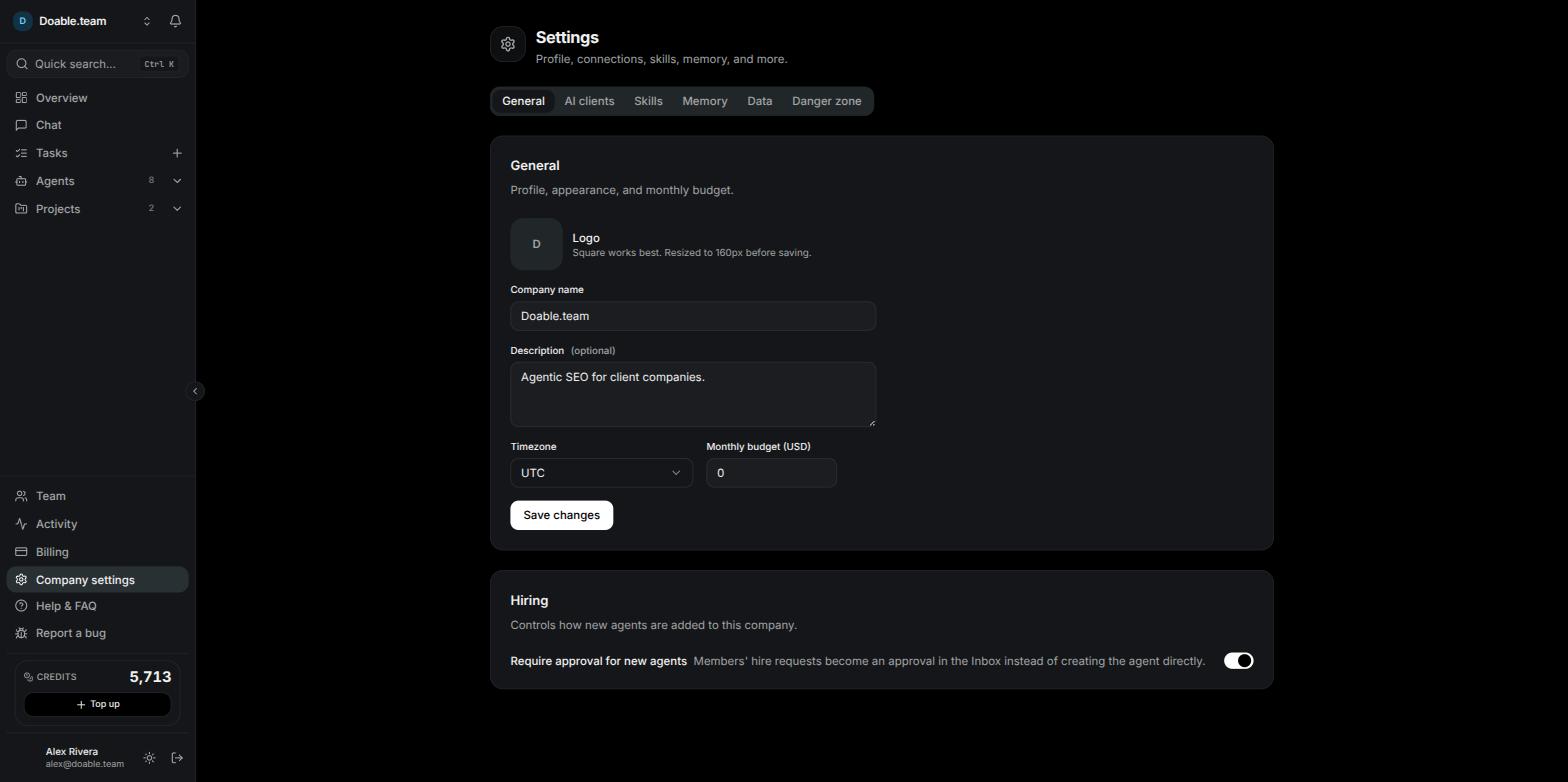
Company settings on the General tab, with the six-tab strip at the top.
Who can open it
Company settings needs the Manage company permission, which the Admin role holds by default. Managers and members have no Company settings link in the sidebar, and opening the address directly shows a 403 — Forbidden page (“You don’t have permission to view this page. Ask a company admin if you need access.”) with a Back to overview button. That means AI clients, data providers and skills are set once per company, by an admin, for everyone. See Team management for roles and the permission matrix, which live on the Team page rather than here.The Company settings, Team, Activity and Billing links stay disabled until your company has finished onboarding.
General
The General card holds how your company appears across the app.1
Set a logo
Hover the square logo tile and click the camera button (Upload logo), then pick an image file. It saves as soon as you choose it — the toast reads Logo updated — and appears in the company switcher at the top of the sidebar. Square images work best; the file is resized to a 160px square before it is saved. Click Remove under Logo to clear it. Anything that isn’t an image is refused with “Pick an image file”.
2
Edit the details
Fill in Company name (required) and Description (optional), then choose a Timezone from the searchable list of time zones, with UTC pinned to the top.
3
Save
Click Save changes. The toast reads Settings saved. An empty name is refused with “Company name is required”.
AI clients
Every Agent runs on one AI client plus one model, chosen on the agent’s Config tab. This tab is where you decide which clients are available to choose from. The card is headed AI clients — “Connect the accounts your agents run on — or use the managed Visibility AI models (no account needed). Each agent picks one client + a model.”When an agent runs on a client you connected, that usage is billed by your provider, not in credits. Only Visibility AI spends credits.
Choose the Visibility AI models agents may pick
1
Open the model list
On the Visibility AI row click Models. The row already tells you how many are on, for example “N/M models enabled”.
2
Tick the models
Tick the models your agents may pick — “Enable the models your agents may pick. Assign one to an agent in its Config tab.” Enable all selects everything, and a counter reads “x/y enabled”.
3
Save
Click Save models. The toast reads Models updated. Per-model rates are shown in the app.
Connect Claude Code, Codex or Gemini CLI
1
Start the sign-in
On the client’s row click Connect. A Connect [client] dialog opens — “Sign in to your [client] account for this company.” — with a countdown reading Finish within and a time.
2
Open the provider's page
Under “1. Open this link and sign in:”, use Copy or Open to open the provider’s sign-in page in a new tab.
3
Hand over the code
If the dialog shows “2. Enter this code on the page:”, copy the code and enter it there. If it instead asks you to “Paste the code shown after you authorise”, paste the code the provider gives you and click Connect — for Claude, “Paste it exactly, including the #.” Otherwise just wait: “Waiting for you to authorise on the page…” finishes on its own.
4
Check the row
The toast reads [client] connected, and the row turns green and shows the connected account.
Only the X or Close control dismisses this dialog — clicking outside it or pressing Esc does nothing, so a sign-in in progress isn’t lost by accident. If the countdown runs out you see “Sign-in window expired — close and reconnect.”
Add a provider to the API Client
1
Open the form
On the API Client row click Add provider. The Add an API provider form expands under the row.
2
Paste your key
Choose a Provider from the dropdown — providers you have already added are ticked — and paste the API key.
3
Connect
Click Connect. The key is checked with a live test call; on success the toast reads Connected [provider] with the number of models it found. A key that fails the check shows “Could not validate the API key”.
Test, curate or disconnect a connected client
Each connected row offers three buttons:- Test re-checks the connection. The toast reads either “[client] connection is valid” with the account, or “[client] couldn’t be verified — reconnect it”.
- Models opens the same model grid as Visibility AI — “Only enabled models can be picked for agents.” Tick the ones you want and click Save models; the client’s own default is marked ”· default”.
- Disconnect removes the connection (toast [client] disconnected). Agents pointed at it need a different client or a Visibility AI model before they can run again.
Data providers
Below the clients, the Data providers card lists the SEO data sources your agents use — DataForSEO for keyword, competitor, backlink and on-page data, Ahrefs for the Domain Rating shown on link prospects, and Google Keyword Planner, which carries a Coming soon badge and cannot be connected yet. Each source runs on Visibility Data by default, meaning it works out of the box on Visibility’s own account. For DataForSEO you can connect your own keys instead, so the calls run on your DataForSEO account and spend no credits.1
Open the key form
On the DataForSEO row click Connect Your Keys (or Replace keys if you added some before) and fill in the login and password fields.
2
Confirm the switch
Click Save keys. You are asked “Stop using Visibility Data?” — the calls will run on your account and won’t spend credits, and you can switch back at any time. Click Use my own keys.
3
Check the badge
A connection test runs automatically and the badge becomes Your keys · connected, or ”· unverified” when the provider cannot be checked, or ”· connection error” with the reason. Click Test whenever you want to re-check.
Skills
A skill is a reusable instruction pack an agent can call on. Install them once here and agents in this company can use installed skills on their next Run.1
Open the picker
Go to the Skills tab and click Add skill. The Add a skill dialog reads “Search the skills.sh registry, or paste a GitHub SKILL.md URL.”
2
Find one
Type at least two characters in Search skills (e.g. seo, schema, outreach)…. Results show each skill’s source and how many times it has been installed; anything you already have reads Added. “No skills found.” means nothing matched.
3
Install it
Click Add on the result, or paste a link in …or a GitHub SKILL.md URL and click Add URL. The toast reads Installed [name].
Memory
The Company memory card is a single shared document every agent in the company reads before it works, shown with a MEMORY.md badge and a token count on the right, so you can see how much of an agent’s context it costs. It starts with the sections Company Mission, Brand, Competitors and Shared Strategy; agents may add more. Empty sections read “Empty.”1
Curate a section
Click Edit on the section, rewrite the text and click Save (toast Section saved), or the X to cancel.
2
Add an atomic fact
Under STRUCTURED FACTS, click Add fact, choose its kind — fact, preference, constraint, playbook or state — type one fact in atomic fact… and press Enter or click Add. Facts are grouped as State (current), Facts, Preferences, Constraints and Playbook, each prefixed with its date.
3
Retire a fact
Hover the fact and click the trash icon (Forget). The toast reads Forgotten.
4
Roll back
Click History to expand the version list, each shown with its date, who changed it and a note, and click Restore on the version you want.
Members can read the company memory elsewhere in the app, but only people with Manage company can edit it.
Data
The Data tab moves a whole company in and out of Visibility as a single JSON file.Export
Click Export company data to download a file namedvisibility-<company-name>.json (toast Export downloaded).
Import
1
Pick the file
Click Import from file… and choose a bundle you exported earlier, up to 16 MB.
2
Let it build the company
On success you see Company imported and land in the new company.
Danger zone
The last tab holds a red-bordered card: “Archiving hides the company and pauses its work — you can restore it anytime. Once archived, it can also be permanently deleted, which erases all its data and cannot be undone.”Archive a company
1
Archive it
Click Archive company, then confirm Archive [name]? with Yes, archive (or Cancel).
2
See where it went
The toast reads Company archived and you are moved to another of your companies, or asked to create one. The archived company stays in the company switcher under an Archived group.
Restore a company
Open the archived company from the Archived group in the switcher. Its overview shows a card — “This company is archived — Its work is paused and it’s hidden from your active companies.” — with Restore company and Go to settings for admins, and the line “Ask a company admin to restore it.” for everyone else. You can also restore it from Danger zone. The toast reads Company restored.Restoring needs an active subscription or a trial that is still running. If the company was suspended for billing, choose a plan first — see Billing and subscriptions.
Delete permanently
1
Archive first
Delete permanently is only offered on an archived company. Until then the server refuses with “Archive the company before deleting it permanently.”
2
Confirm
In Danger zone, click Delete permanently, read “Permanently delete [name] and all its data? This cannot be undone.” and click Yes, delete forever (or Cancel).