

The plans
Both Starter and Growth include 5,000 credits per month, refilled on the 1st of each month. Prices are in US dollars and billed monthly.
The Growth card carries a Recommended ribbon. The Enterprise card has a Contact sales button that opens an email to the sales team instead of a checkout.
Plan limits are counted across the whole Company, not per project. Adding a fourth project on Starter is refused with a message telling you to upgrade, and the same applies to agents and team members. See Team management for how member seats are used.
The 7-day free trial
Both Starter and Growth start with a 7-day free trial, chosen when you create the Company. Starting the trial goes through secure checkout and requires a card, but you are not charged until the trial ends. To pay straight away instead, click Skip trial & pay now on the plan card.- The trial clock starts when the workspace launches, not when you name the Company.
- The trial runs on the full limits of the plan you picked.
- It includes a starter allowance of credits, so you can try the metered features immediately.
- Subscribing during the trial does not start a second trial and is never double-charged.
The subscription banner
A banner appears across the top of every company page when the subscription needs attention. It disappears while everything is current.
Members who cannot manage billing see the same message worded as a request to ask a company admin, with no button. The suspended and deletion banners cannot be dismissed; the others come back the next day.
When a trial ends without a subscription
The workspace is locked as soon as the trial runs out. The status becomes Suspended, the Company becomes read-only and its agents are paused. Nothing is deleted. While a workspace is locked you can still read everything and open the Billing page, but creating tasks, resuming agents and starting runs are refused with “This workspace is locked — its subscription has ended. An admin can reactivate it from Billing.” Choose a plan and pay to bring it back; see Reactivate a locked workspace.The Billing page
Open Billing from the sidebar, or press Ctrl/⌘ K and search for “billing”. The header reads “Billing — Plan, credits, usage, and add-ons.” and the page has two tabs: Overview and History.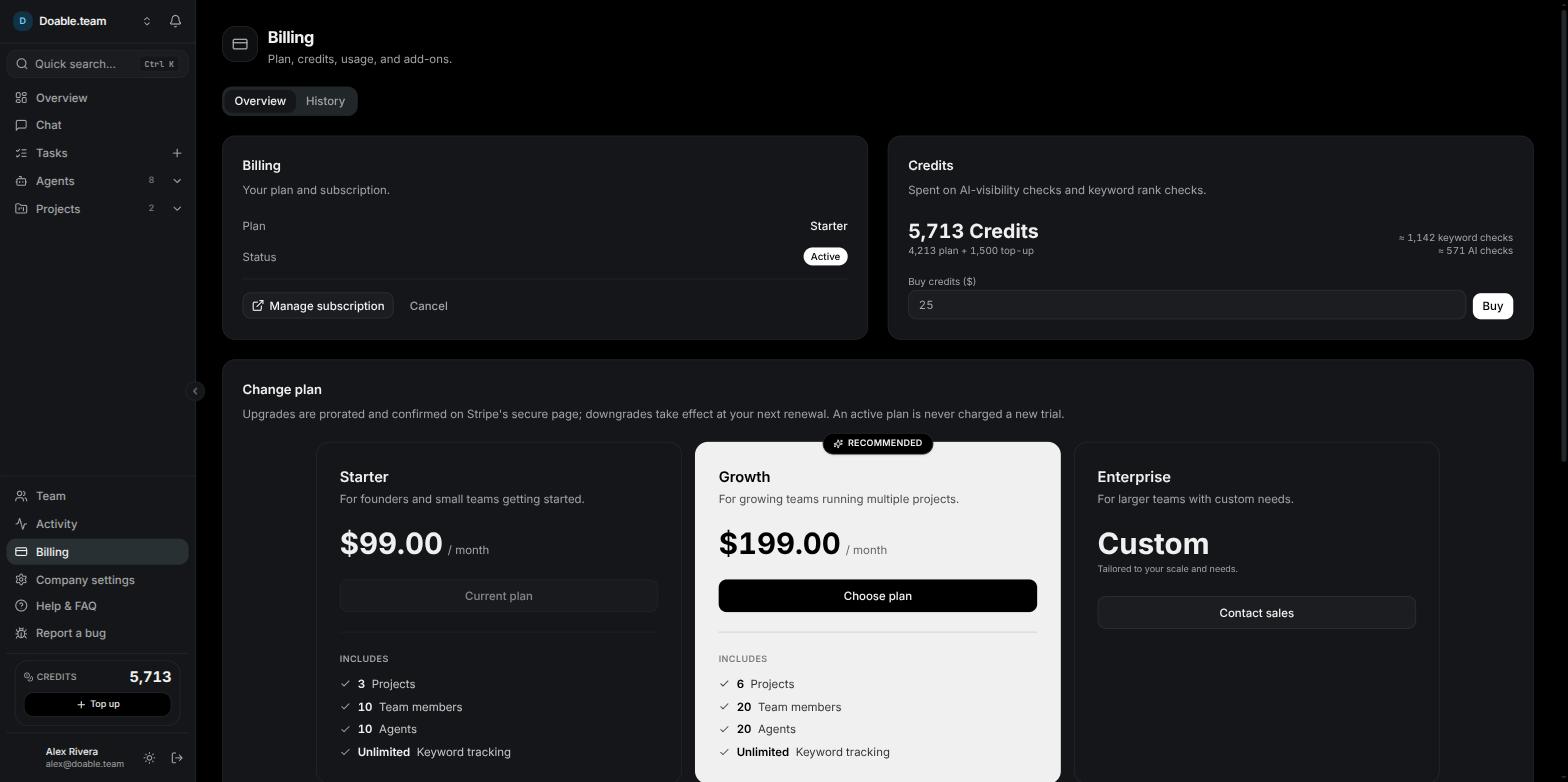
The Billing page on the Overview tab: plan and status, the credit balance, the plan cards and the usage meters.
Overview
The Overview tab stacks four things, one under the other on a narrow screen:- Billing — Your plan and subscription. The plan name, a status badge, and the Manage subscription and Cancel buttons.
- Credits — Spent on AI-visibility checks and keyword rank checks. Your balance, how it splits between the monthly plan allowance and credits you bought, roughly how many keyword checks and AI checks it covers, and a Buy credits ($) field with a Buy button. See Credits and BYOK.
- Change plan. The plan cards, used to subscribe, upgrade or downgrade. On a locked workspace this card is replaced by Reactivate subscription.
- Usage — Plan limits across all of this company’s projects. Meters for Projects, Members, Agents, Keywords and AI-visibility prompts, each shown as used against the limit, or against ∞ when unlimited. A bar turns amber at 80% and red once you hit the limit.
Status badges
Subscribe or change plan
1
Open the Change plan card
Go to Billing → Overview and scroll to Change plan. Your current plan’s card reads Current plan and is disabled; choosing it again returns “You’re already on this plan.”
2
Choose the plan you want
Click Choose plan on the other card.
3
Finish on the secure page
Upgrades are prorated and confirmed on a secure payment page; promotion codes are accepted there. The new plan takes effect once the payment goes through. If you close the page you see “Checkout cancelled — No payment was taken.” and nothing changes.
Manage your card and invoices
Click Manage subscription on the Billing card to open the secure billing portal. There you can update the payment method, download invoices and receipts, and cancel or undo a pending cancellation. Use the portal’s back link to return to Visibility. Invoices live in the portal only — Visibility does not keep a copy inside the app.Cancel a subscription
Click Cancel on the Billing card while the subscription is Active or in Trial. The subscription stops renewing at the end of the current paid period and you keep full access until then, so the badge still reads Active for the rest of the period. When the period ends the status becomes Cancelled, agents are paused and the Company is archived and read-only. Your data is kept for 15 more days, counted down by the banner “This company’s data is deleted in N days unless you resubscribe.” Choose a plan again from Billing within that window to bring the workspace back.Reactivate a locked workspace
A Suspended or Cancelled workspace is reactivated the same way.1
Open Billing
Click Reactivate in the banner, or open Billing from the sidebar. The Billing page stays available even while the workspace is locked.
2
Pick a plan
In the Reactivate subscription card — “This workspace is locked — its subscription has ended. Pick a plan to reactivate it and bring your agents back.” — click Choose plan.
3
Pay at secure checkout
Reactivation is a real purchase; there is no second trial.
4
Check your agents
Once the payment lands you see “Subscription reactivated” and the Company is unarchived. Only the agents that were paused for billing are resumed — an agent you paused yourself stays paused. See Agents.
History
The History tab is the record of everything that has happened to the money side of your Company.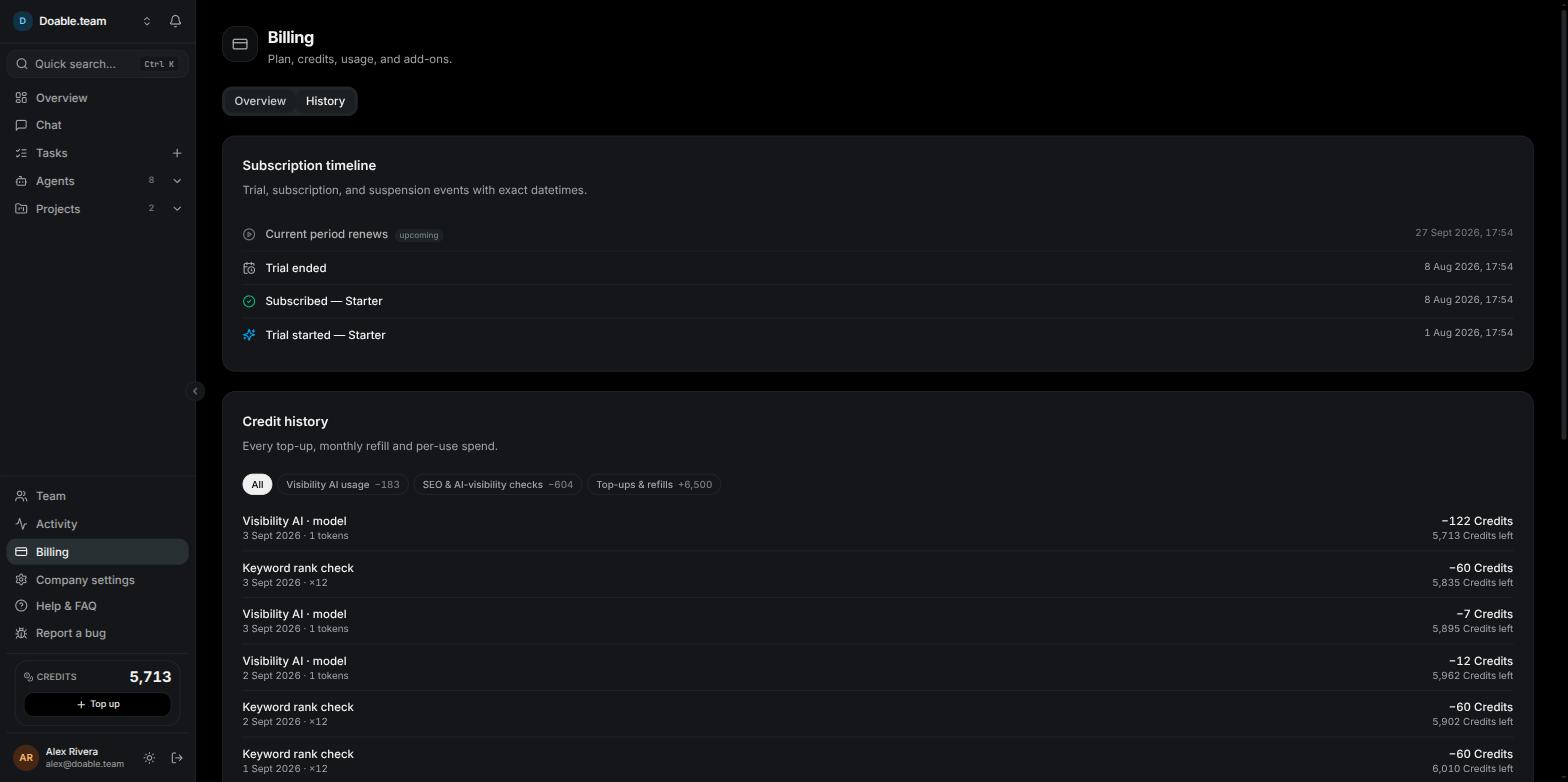
The History tab: the subscription timeline above the filterable credit history.
Who can manage billing
Billing is gated by the Manage billing permission — “Plan, subscription, payment, and credits.” The Admin role has it by default; Manager and Member do not.- Without it, Billing does not appear in the sidebar and the page cannot be opened directly.
- Without it, the sidebar credit card and its Top up button are hidden.
- Without it, you still see the subscription banner, worded as a prompt to ask a company admin.
Next steps
Credits and BYOK
What each action costs, buying top-ups, and running work on your own keys.
Team management
Roles, permissions and the member seats your plan allows.
Company settings
AI clients, data providers and everything else set per Company.
Getting started
Create a Company, pick a plan and launch your first project.